The Tree Data Structure презентация
Содержание
- 2. Outline In this topic, we will cover: Definition of a tree
- 3. The Tree Data Structure Trees are the first data structure different
- 4. Trees A rooted tree data structure stores information in nodes Similar
- 5. Terminology All nodes will have zero or more child nodes or
- 6. Terminology The degree of a node is defined as the number
- 7. Terminology Phylogenetic trees have nodes with degree 2 or 0:
- 8. Terminology Nodes with degree zero are also called leaf nodes
- 9. Terminology Leaf nodes:
- 10. Terminology Internal nodes:
- 11. Terminology These trees are equal if the order of the children
- 12. Terminology The shape of a rooted tree gives a natural flow
- 13. Terminology A path is a sequence of nodes (a0, a1,
- 14. Terminology Paths of length 10 (11 nodes) and 4 (5 nodes)
- 15. Terminology For each node in a tree, there exists a unique
- 16. Terminology Nodes of depth up to 17
- 17. Terminology The height of a tree is defined as the maximum
- 18. Terminology The height of this tree is 17
- 19. Terminology If a path exists from node a to node b:
- 20. Terminology The descendants of node B are B, C, D, E,
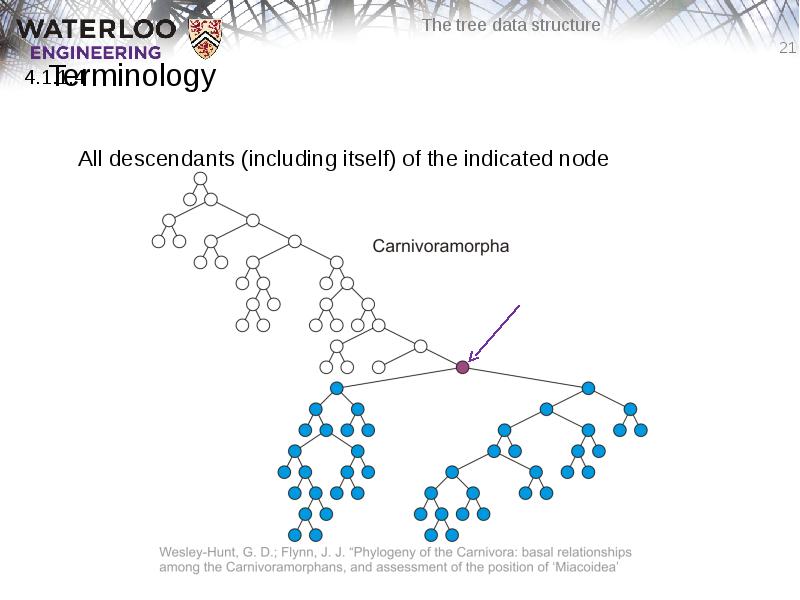
- 21. Terminology All descendants (including itself) of the indicated node
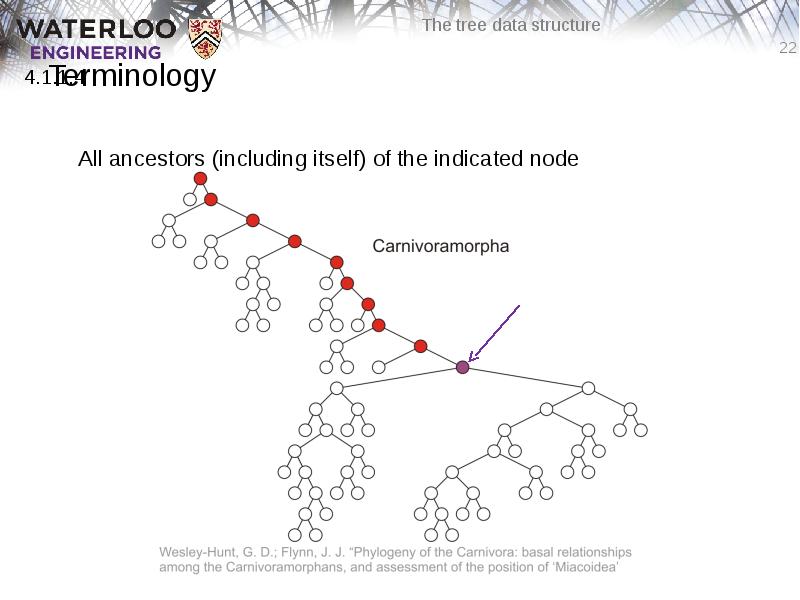
- 22. Terminology All ancestors (including itself) of the indicated node
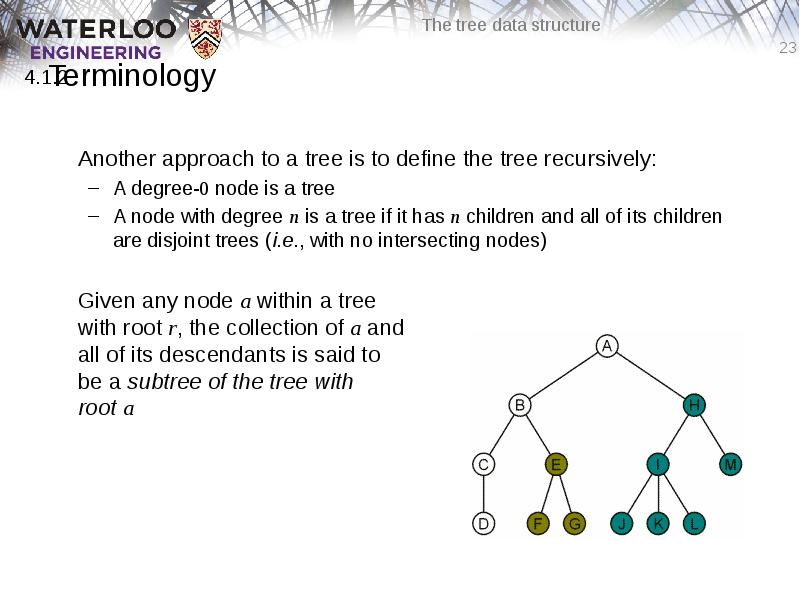
- 23. Terminology Another approach to a tree is to define the tree
- 24. Example: XHTML and CSS The XML of XHTML has a tree
- 25. Example: XHTML and CSS Consider the following XHTML document <html>
- 26. Example: XHTML and CSS Consider the following XHTML document <html>
- 27. Example: XHTML and CSS The nested tags define a tree rooted
- 28. Example: XHTML and CSS Web browsers render this tree as a
- 29. Example: XHTML and CSS XML tags <tag>...</tag> must be nested For
- 30. Example: XHTML and CSS Cascading Style Sheets (CSS) make use of
- 31. Example: XHTML and CSS For example, this style renders as follows:
- 32. Example: XHTML and CSS For example, this style renders as follows:
- 33. Example: XHTML and CSS Suppose you don’t want underlined items in
- 34. Example: XHTML and CSS For example, this style renders as follows:
- 35. Example: XHTML and CSS You can read the second style
- 36. Example: XML In general, any XML can be represented as a
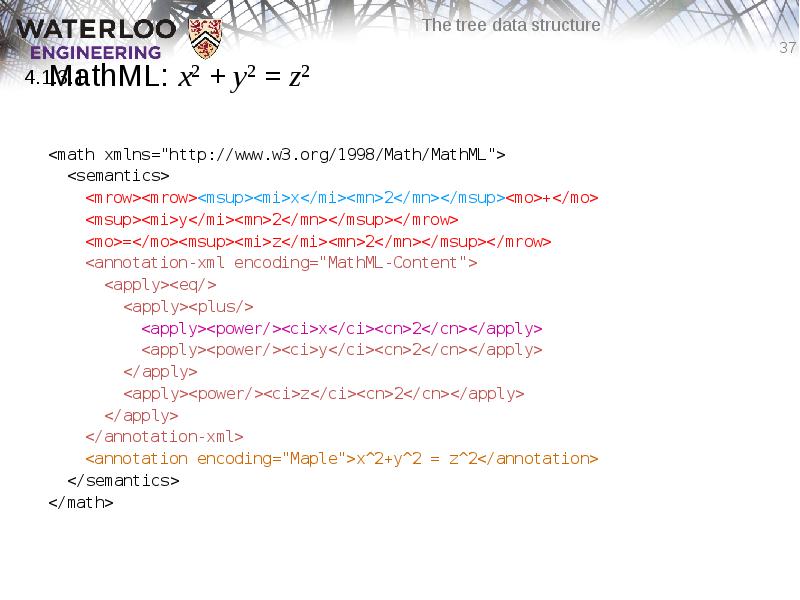
- 37. MathML: x2 + y2 = z2 <math xmlns="http://www.w3.org/1998/Math/MathML"> <semantics> <mrow><mrow><msup><mi>x</mi><mn>2</mn></msup><mo>+</mo>
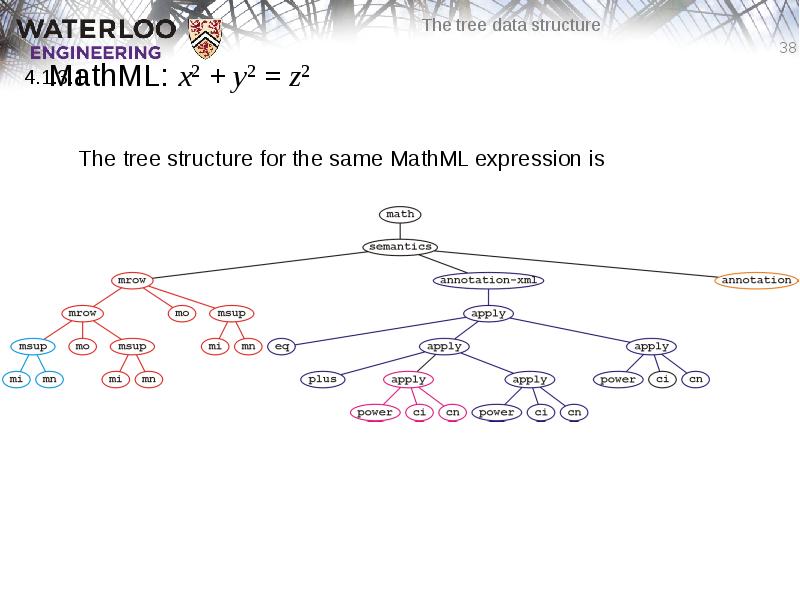
- 38. MathML: x2 + y2 = z2 The tree structure for the
- 39. MathML: x2 + y2 = z2 Why use 500 characters to
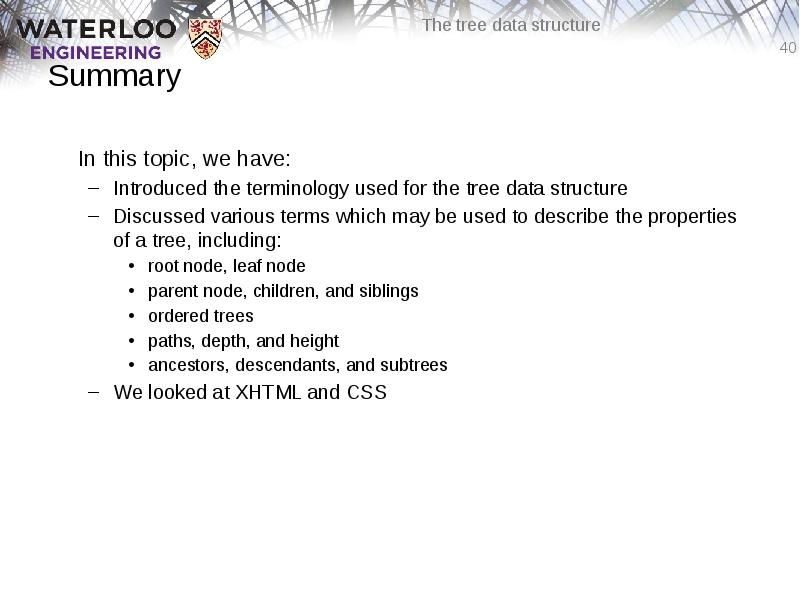
- 40. Summary In this topic, we have: Introduced the terminology used for
- 41. References [1] Donald E. Knuth, The Art of Computer Programming, Volume 1:
- 42. Usage Notes These slides are made publicly available on the web
- 43. Скачать презентацию




![References
[1] Donald E. Knuth, The Art of Computer Programming, Volume 1:](/documents_7/75ca28ff685f408177a364e31a7786cb/img40.jpg "References
[1] Donald E. Knuth, The Art of Computer Programming, Volume 1:")
Слайды и текст этой презентации
Слайд 1
Описание слайда:
Слайд 2
Описание слайда:
Outline
In this topic, we will cover:
Definition of a tree data structure and its components
Concepts of:
Root, internal, and leaf nodes
Parents, children, and siblings
Paths, path length, height, and depth
Ancestors and descendants
Ordered and unordered trees
Subtrees
Examples
XHTML and CSS
Слайд 3
Описание слайда:
The Tree Data Structure
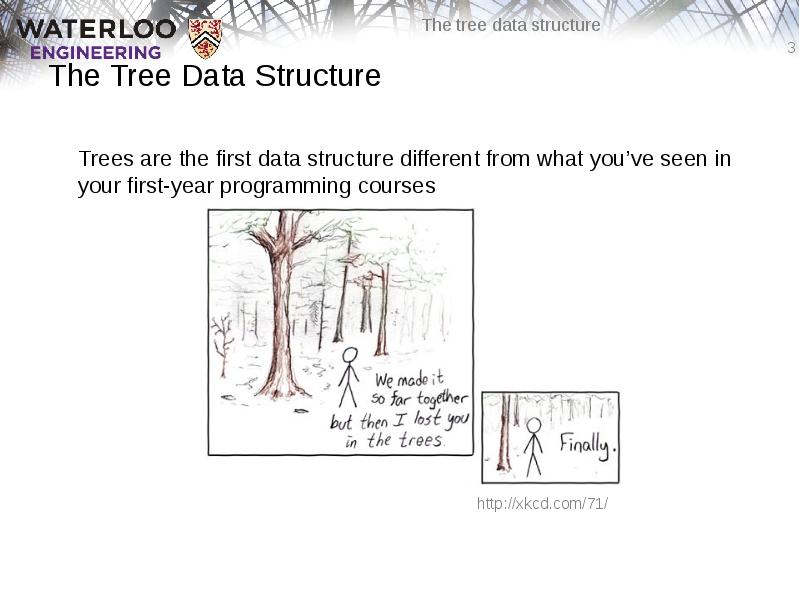
Trees are the first data structure different from what you’ve seen in your first-year programming courses
Слайд 4
Описание слайда:
Trees
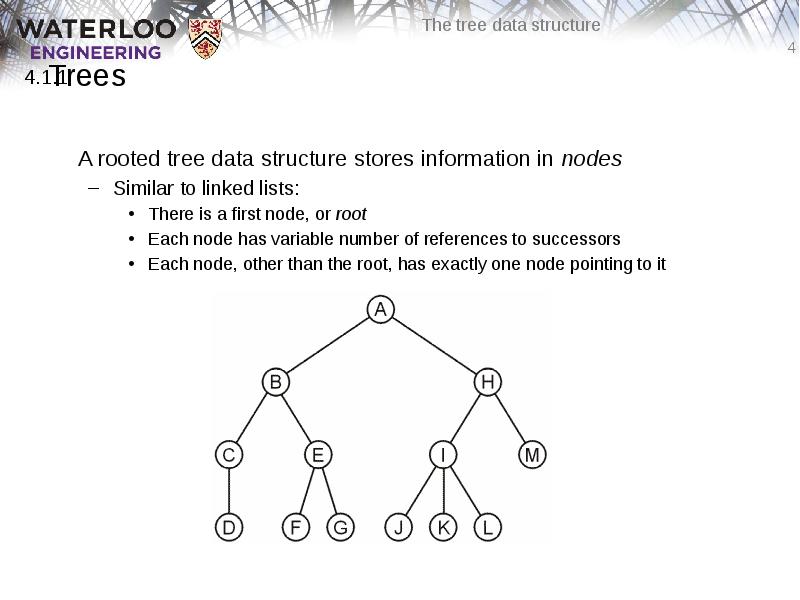
A rooted tree data structure stores information in nodes
Similar to linked lists:
There is a first node, or root
Each node has variable number of references to successors
Each node, other than the root, has exactly one node pointing to it
Слайд 5
Описание слайда:
Terminology
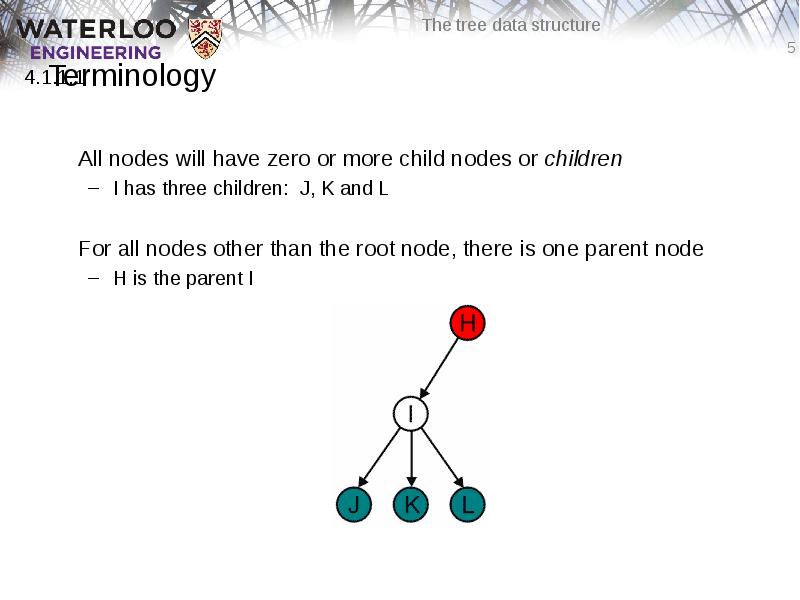
All nodes will have zero or more child nodes or children
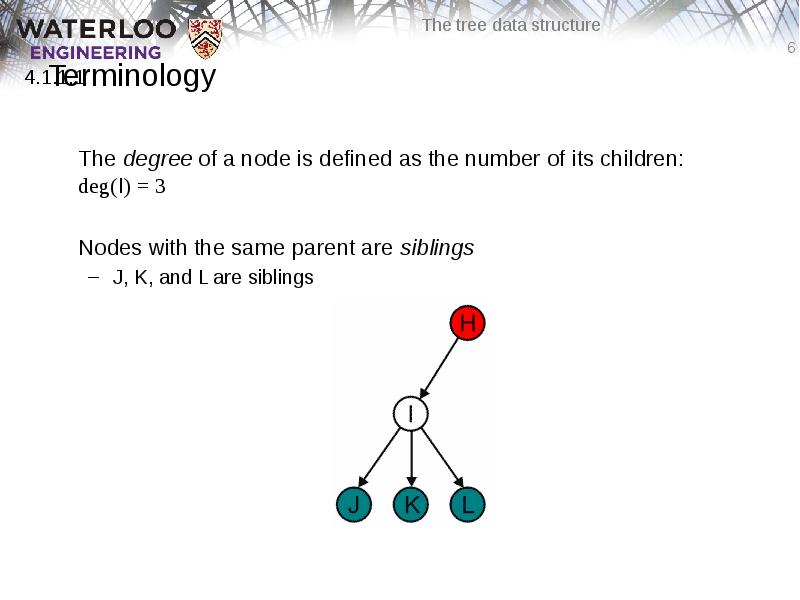
I has three children: J, K and L
For all nodes other than the root node, there is one parent node
H is the parent I
Слайд 6
Описание слайда:
Terminology
The degree of a node is defined as the number of its children: deg(I) = 3
Nodes with the same parent are siblings
J, K, and L are siblings
Слайд 7
Описание слайда:
Terminology
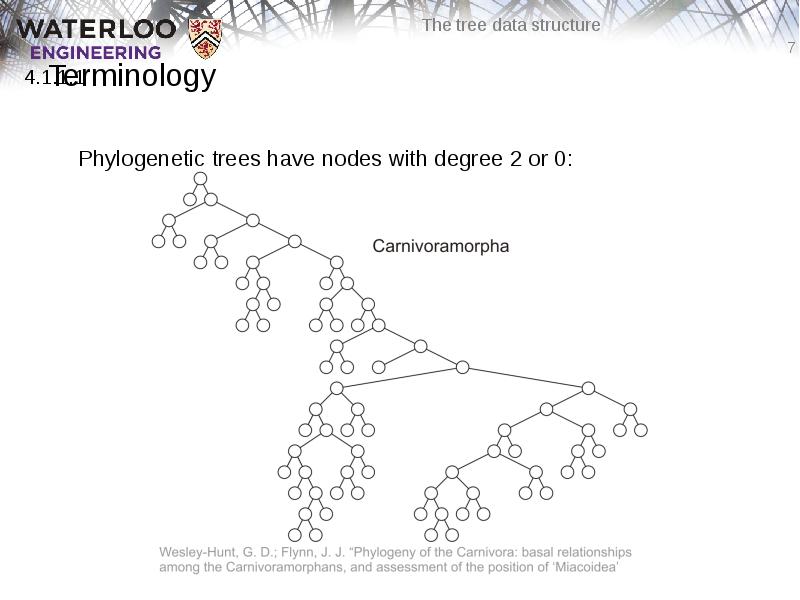
Phylogenetic trees have nodes with degree 2 or 0:
Слайд 8
Описание слайда:
Terminology
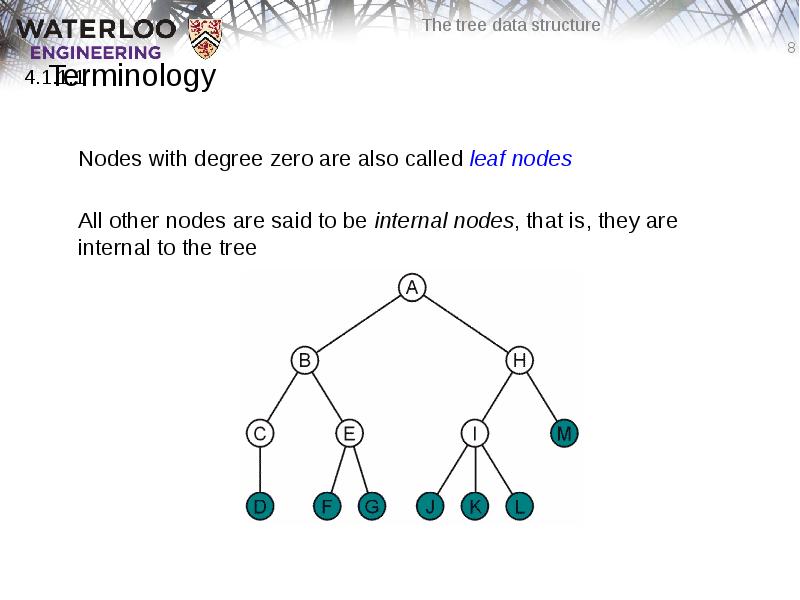
Nodes with degree zero are also called leaf nodes
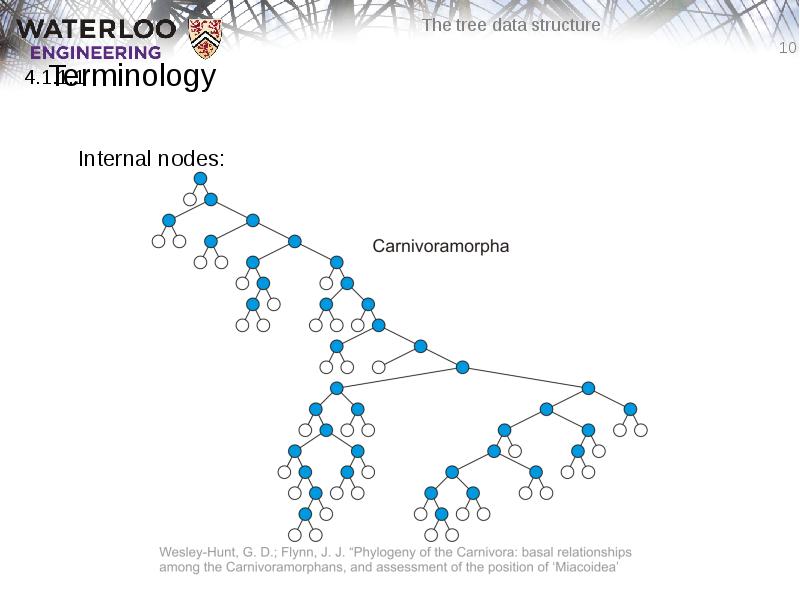
All other nodes are said to be internal nodes, that is, they are internal to the tree
Слайд 9
Описание слайда:
Terminology
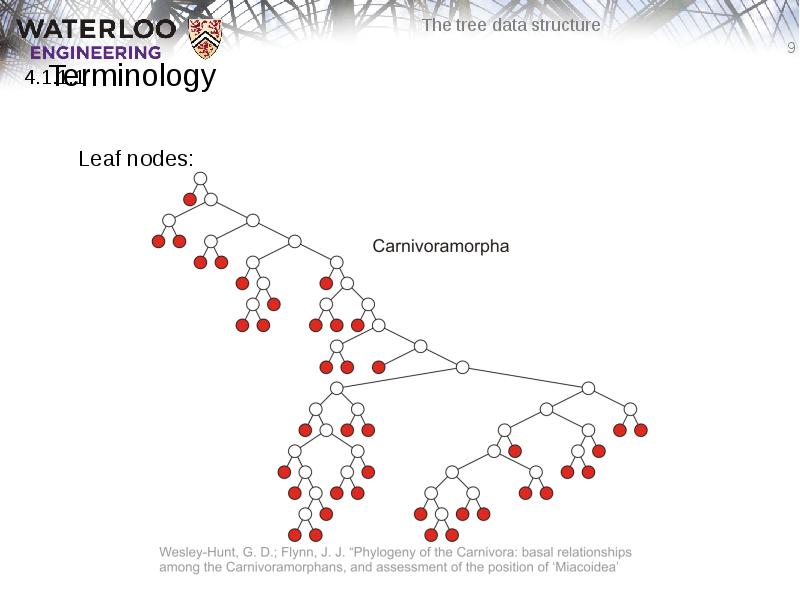
Leaf nodes:
Слайд 10
Описание слайда:
Terminology
Internal nodes:
Слайд 11
Описание слайда:
Terminology
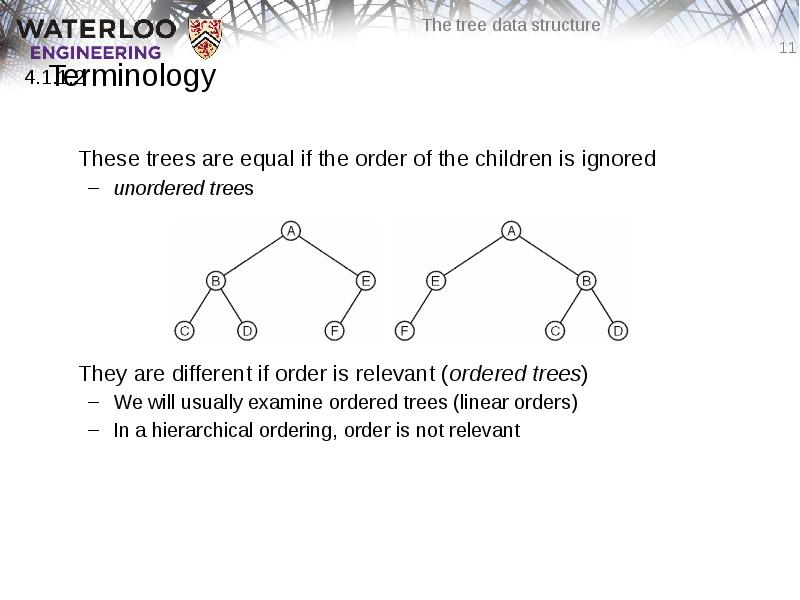
These trees are equal if the order of the children is ignored
unordered trees
They are different if order is relevant (ordered trees)
We will usually examine ordered trees (linear orders)
In a hierarchical ordering, order is not relevant
Слайд 12
Описание слайда:
Terminology
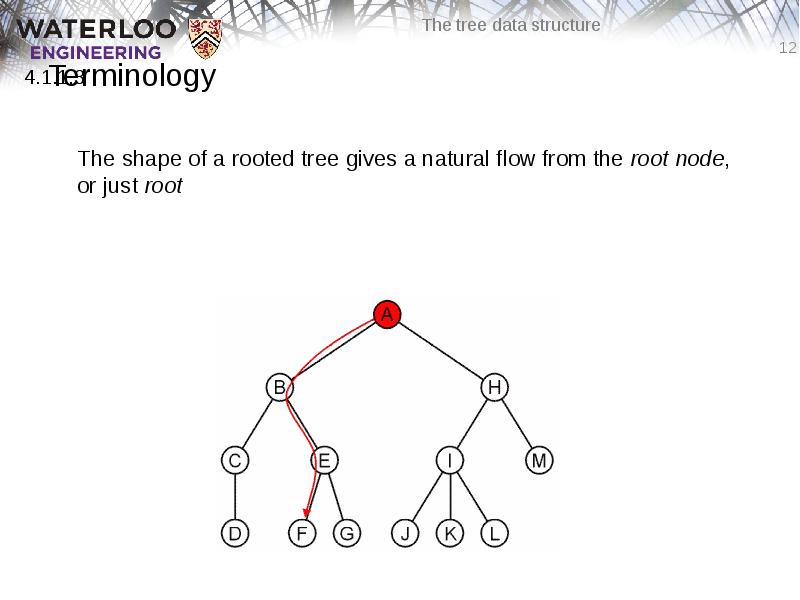
The shape of a rooted tree gives a natural flow from the root node, or just root
Слайд 13
Описание слайда:
Terminology
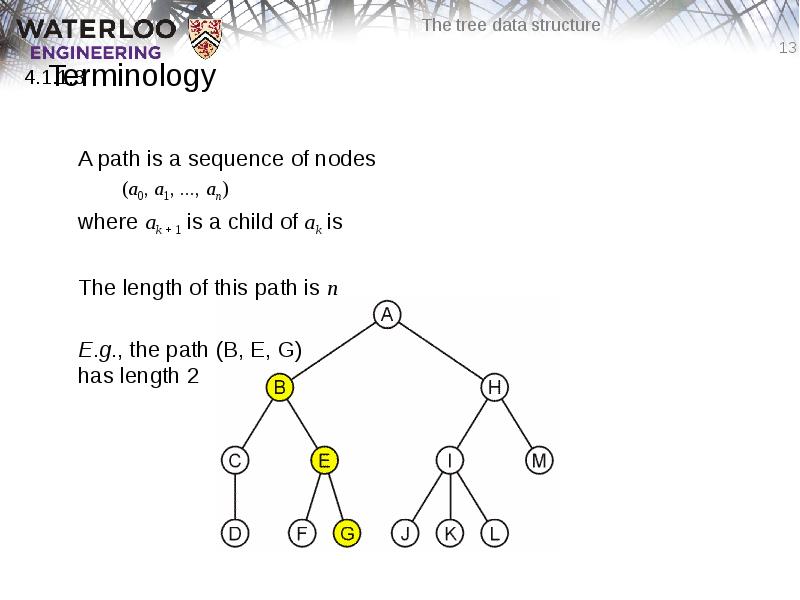
A path is a sequence of nodes
(a0, a1, ..., an)
where ak + 1 is a child of ak is
The length of this path is n
E.g., the path (B, E, G)
has length 2
Слайд 14
Описание слайда:
Terminology
Paths of length 10 (11 nodes) and 4 (5 nodes)
Слайд 15
Описание слайда:
Terminology
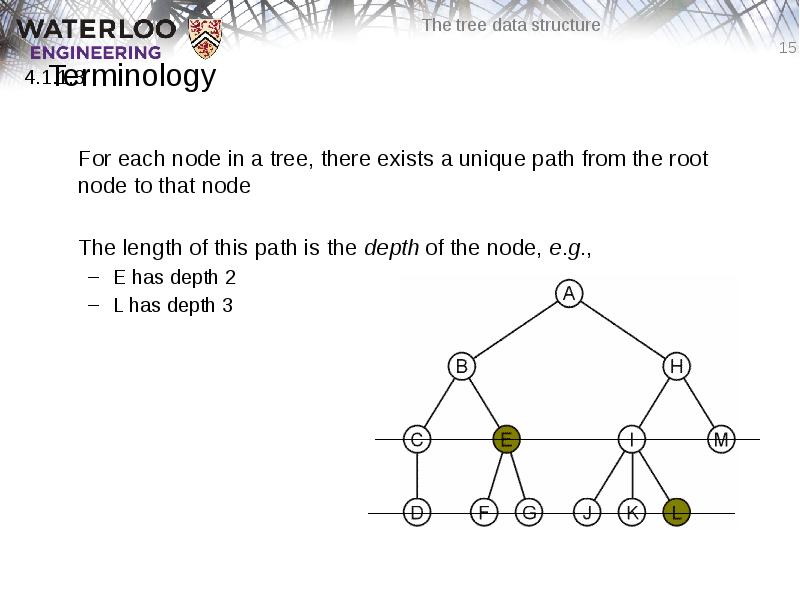
For each node in a tree, there exists a unique path from the root node to that node
The length of this path is the depth of the node, e.g.,
E has depth 2
L has depth 3
Слайд 16
Описание слайда:
Terminology
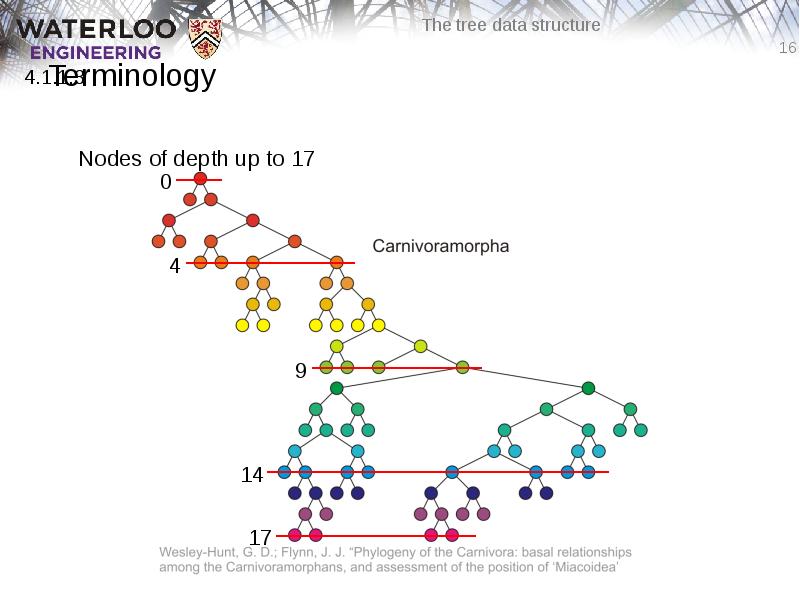
Nodes of depth up to 17
Слайд 17
Описание слайда:
Terminology
The height of a tree is defined as the maximum depth of any node within the tree
The height of a tree with one node is 0
Just the root node
For convenience, we define the height of the empty tree to be –1
Слайд 18
Описание слайда:
Terminology
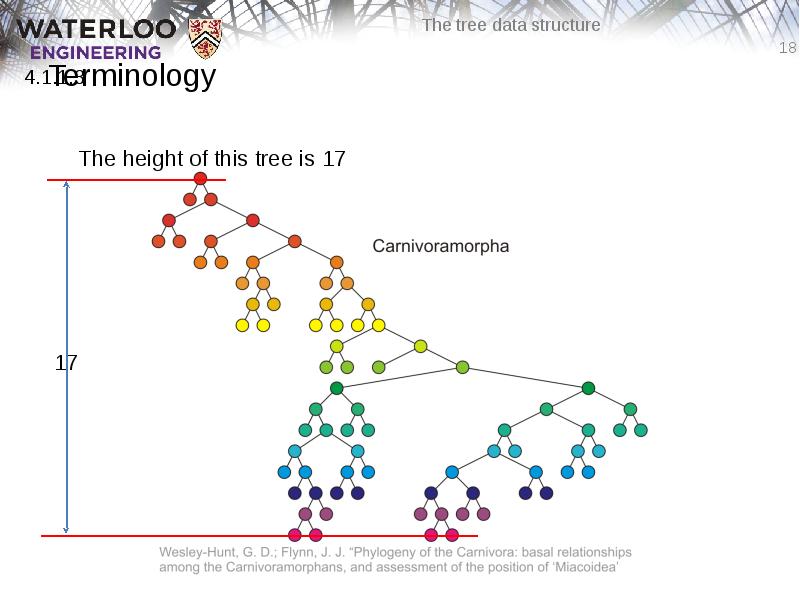
The height of this tree is 17
Слайд 19
Описание слайда:
Terminology
If a path exists from node a to node b:
a is an ancestor of b
b is a descendent of a
Thus, a node is both an ancestor and a descendant of itself
We can add the adjective strict to exclude equality: a is a strict descendent of b if a is a descendant of b but a ≠ b
The root node is an ancestor of all nodes
Слайд 20
Описание слайда:
Terminology
The descendants of node B are B, C, D, E, F, and G:
The ancestors of node I are I, H, and A:
Слайд 21
Описание слайда:
Terminology
All descendants (including itself) of the indicated node
Слайд 22
Описание слайда:
Terminology
All ancestors (including itself) of the indicated node
Слайд 23
Описание слайда:
Terminology
Another approach to a tree is to define the tree recursively:
A degree-0 node is a tree
A node with degree n is a tree if it has n children and all of its children are disjoint trees (i.e., with no intersecting nodes)
Given any node a within a tree
with root r, the collection of a and
all of its descendants is said to
be a subtree of the tree with
root a
Слайд 24
Описание слайда:
Example: XHTML and CSS
The XML of XHTML has a tree structure
Cascading Style Sheets (CSS) use the tree structure to modify the display of HTML
Слайд 25
Описание слайда:
Example: XHTML and CSS
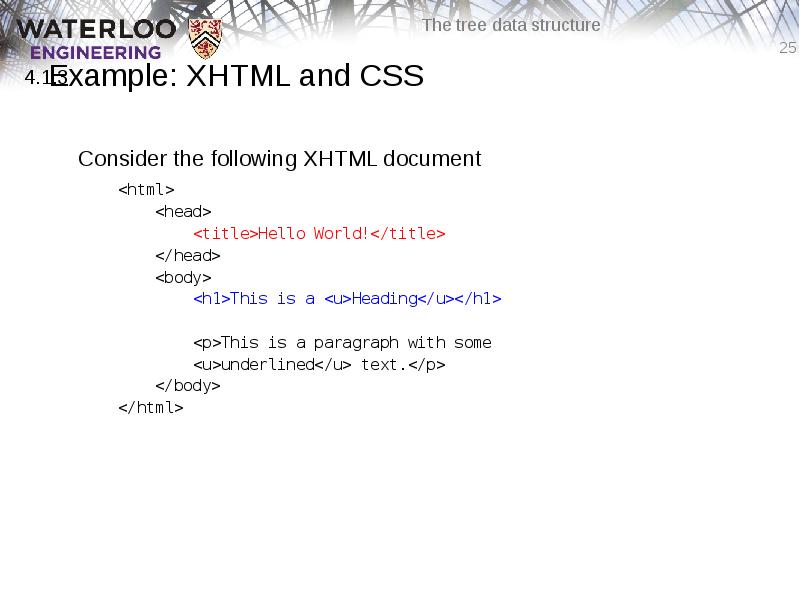
Consider the following XHTML document
<html>
<head>
<title>Hello World!</title>
</head>
<body>
<h1>This is a <u>Heading</u></h1>
<p>This is a paragraph with some
<u>underlined</u> text.</p>
</body>
</html>
Слайд 26
Описание слайда:
Example: XHTML and CSS
Consider the following XHTML document
<html>
<head>
<title>Hello World!</title>
</head>
<body>
<h1>This is a <u>Heading</u></h1>
<p>This is a paragraph with some
<u>underlined</u> text.</p>
</body>
</html>
Слайд 27
Описание слайда:
Example: XHTML and CSS
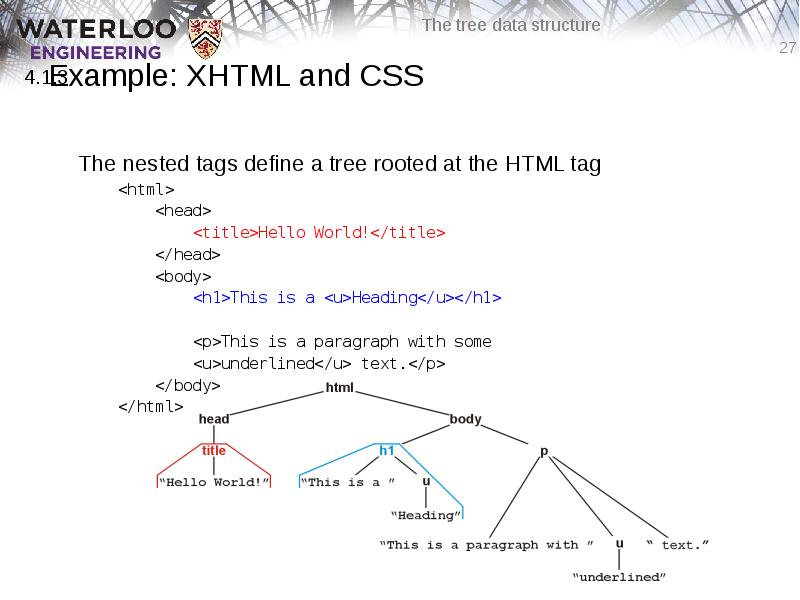
The nested tags define a tree rooted at the HTML tag
<html>
<head>
<title>Hello World!</title>
</head>
<body>
<h1>This is a <u>Heading</u></h1>
<p>This is a paragraph with some
<u>underlined</u> text.</p>
</body>
</html>
Слайд 28
Описание слайда:
Example: XHTML and CSS
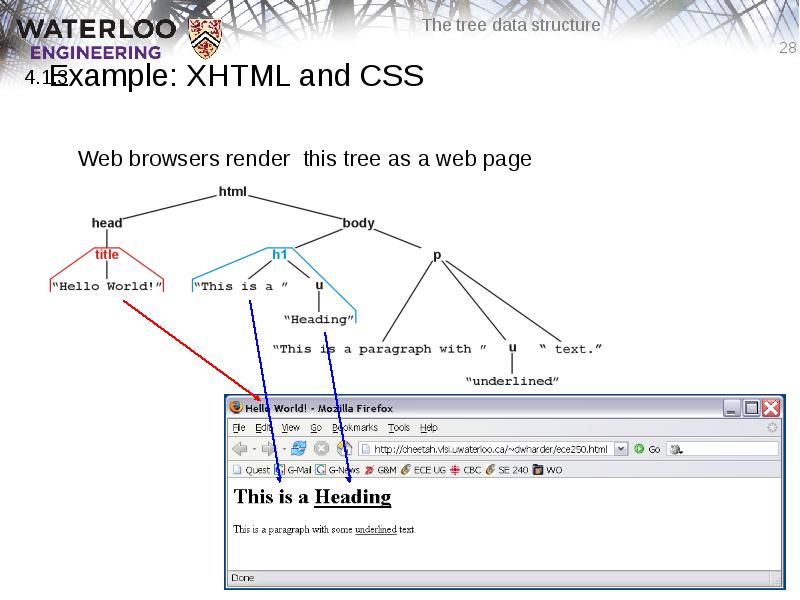
Web browsers render this tree as a web page
Слайд 29
Описание слайда:
Example: XHTML and CSS
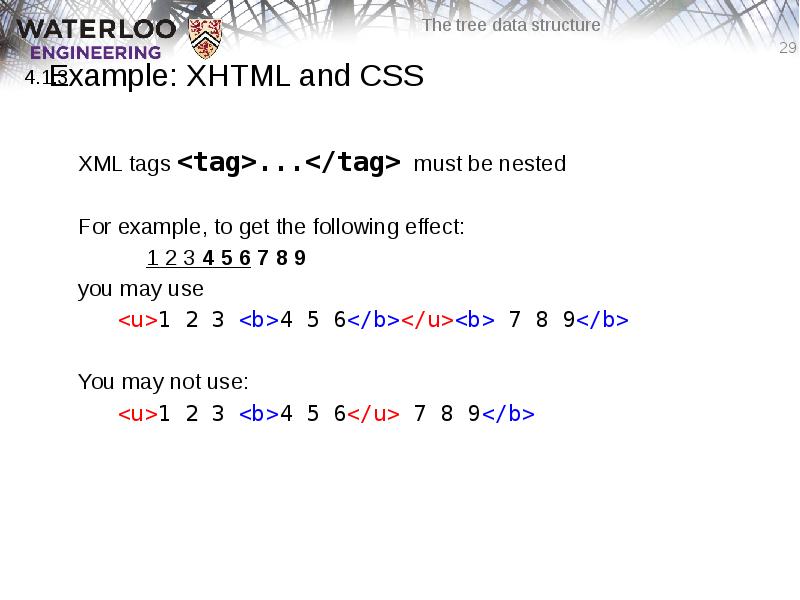
XML tags <tag>...</tag> must be nested
For example, to get the following effect:
1 2 3 4 5 6 7 8 9
you may use
<u>1 2 3 <b>4 5 6</b></u><b> 7 8 9</b>
You may not use:
<u>1 2 3 <b>4 5 6</u> 7 8 9</b>
Слайд 30
Описание слайда:
Example: XHTML and CSS
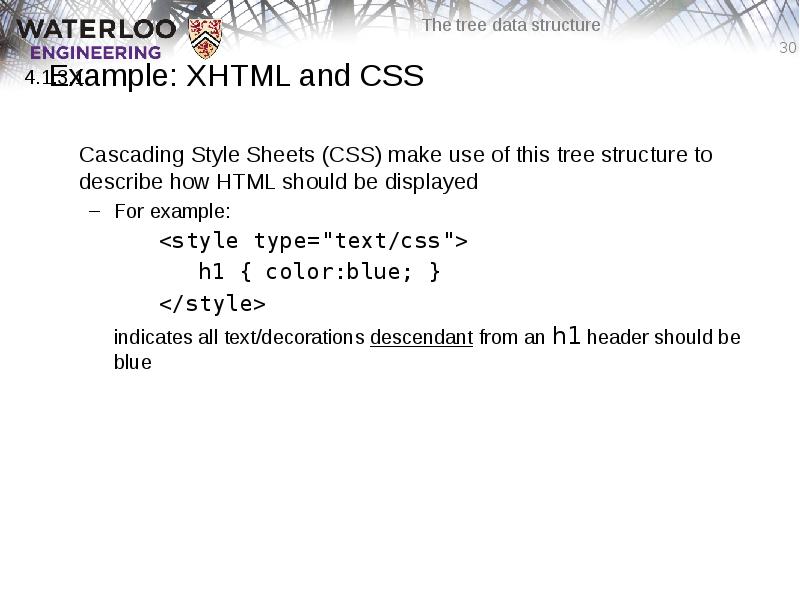
Cascading Style Sheets (CSS) make use of this tree structure to describe how HTML should be displayed
For example:
<style type="text/css">
h1 { color:blue; }
</style>
indicates all text/decorations descendant from an h1 header should be blue
Слайд 31
Описание слайда:
Example: XHTML and CSS
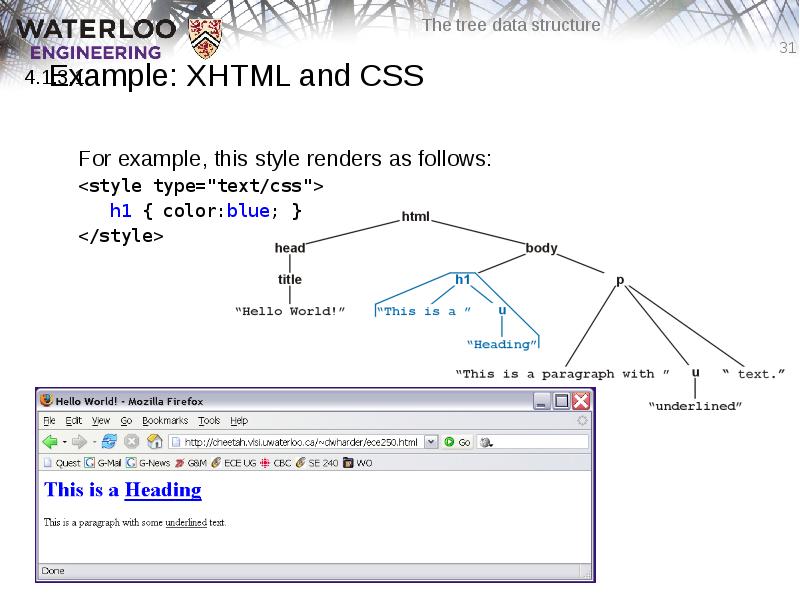
For example, this style renders as follows:
<style type="text/css">
h1 { color:blue; }
</style>
Слайд 32
Описание слайда:
Example: XHTML and CSS
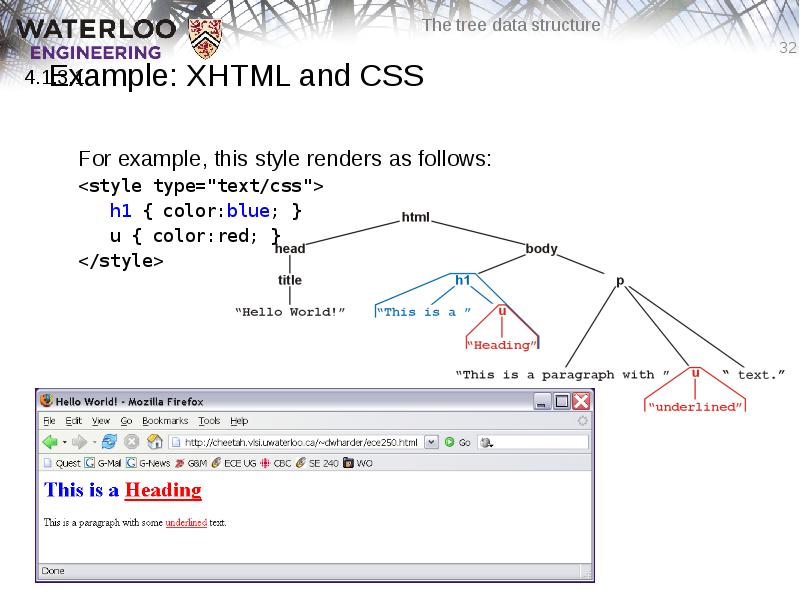
For example, this style renders as follows:
<style type="text/css">
h1 { color:blue; }
u { color:red; }
</style>
Слайд 33
Описание слайда:
Example: XHTML and CSS
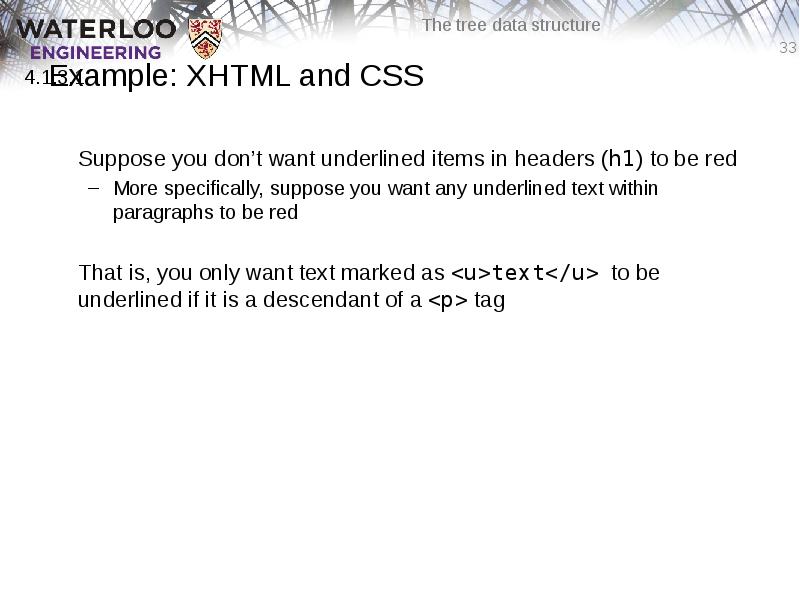
Suppose you don’t want underlined items in headers (h1) to be red
More specifically, suppose you want any underlined text within paragraphs to be red
That is, you only want text marked as <u>text</u> to be underlined if it is a descendant of a <p> tag
Слайд 34
Описание слайда:
Example: XHTML and CSS
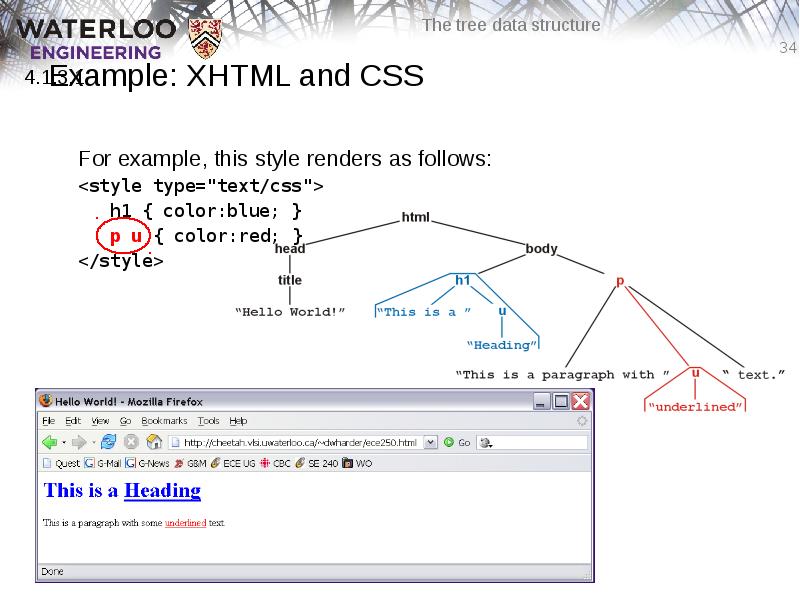
For example, this style renders as follows:
<style type="text/css">
h1 { color:blue; }
p u { color:red; }
</style>
Слайд 35
Описание слайда:
Example: XHTML and CSS
You can read the second style
<style type="text/css">
h1 { color:blue; }
p u { color:red; }
</style>
as saying “text/decorations descendant from the underlining tag (<u>) which itself is a descendant of a paragraph tag should be coloured red”
Слайд 36
Описание слайда:
Example: XML
In general, any XML can be represented as a tree
All XML tools make use of this feature
Parsers convert XML into an internal tree structure
XML transformation languages manipulate the tree structure
E.g., XMLT
Слайд 37
Описание слайда:
MathML: x2 + y2 = z2
<math xmlns="http://www.w3.org/1998/Math/MathML">
<semantics>
<mrow><mrow><msup><mi>x</mi><mn>2</mn></msup><mo>+</mo>
<msup><mi>y</mi><mn>2</mn></msup></mrow>
<mo>=</mo><msup><mi>z</mi><mn>2</mn></msup></mrow>
<annotation-xml encoding="MathML-Content">
<apply><eq/>
<apply><plus/>
<apply><power/><ci>x</ci><cn>2</cn></apply>
<apply><power/><ci>y</ci><cn>2</cn></apply>
</apply>
<apply><power/><ci>z</ci><cn>2</cn></apply>
</apply>
</annotation-xml>
<annotation encoding="Maple">x^2+y^2 = z^2</annotation>
</semantics>
</math>
Слайд 38
Описание слайда:
MathML: x2 + y2 = z2
The tree structure for the same MathML expression is
Слайд 39
Описание слайда:
MathML: x2 + y2 = z2
Why use 500 characters to describe the equation
x2 + y2 = z2
which, after all, is only twelve characters (counting spaces)?
The root contains three children, each different codings of:
How it should look (presentation),
What it means mathematically (content), and
A translation to a specific language (Maple)
Слайд 40
Описание слайда:
Summary
In this topic, we have:
Introduced the terminology used for the tree data structure
Discussed various terms which may be used to describe the properties of a tree, including:
root node, leaf node
parent node, children, and siblings
ordered trees
paths, depth, and height
ancestors, descendants, and subtrees
We looked at XHTML and CSS
Слайд 41
Описание слайда:
References
[1] Donald E. Knuth, The Art of Computer Programming, Volume 1: Fundamental Algorithms, 3rd Ed., Addison Wesley, 1997, §2.2.1, p.238.
Слайд 42
Описание слайда:
Usage Notes
These slides are made publicly available on the web for anyone to use
If you choose to use them, or a part thereof, for a course at another institution, I ask only three things:
that you inform me that you are using the slides,
that you acknowledge my work, and
that you alert me of any mistakes which I made or changes which you make, and allow me the option of incorporating such changes (with an acknowledgment) in my set of slides
Sincerely,
Douglas Wilhelm Harder, MMath
[email protected]
Скачать презентацию на тему The Tree Data Structure можно ниже: