Advanced x86. BIOS and System Management Mode Internals Reset Vector презентация
Содержание
- 2. All materials are licensed under a Creative Commons “Share Alike” license.
- 3. Reset Vector Execution Environment
- 4. Real-Address Mode (Real Mode) The original x86 operating mode Referred to
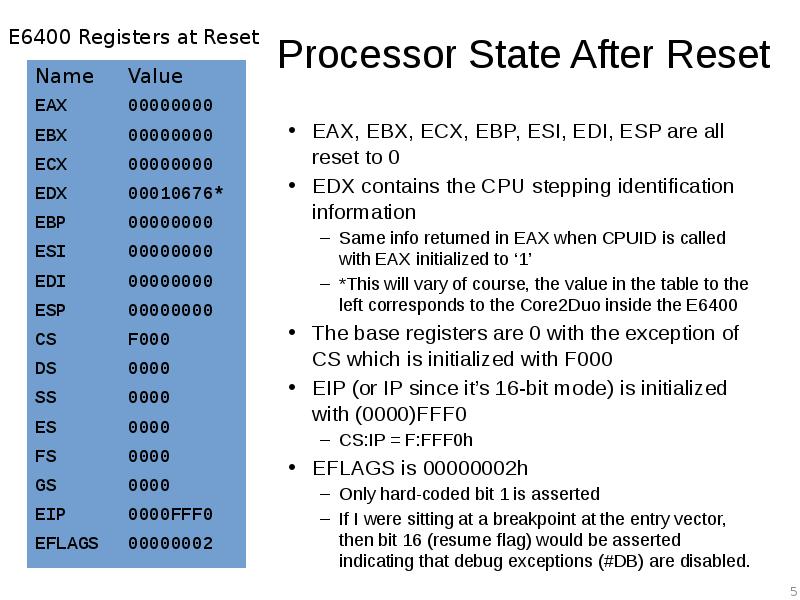
- 5. Processor State After Reset EAX, EBX, ECX, EBP, ESI, EDI, ESP
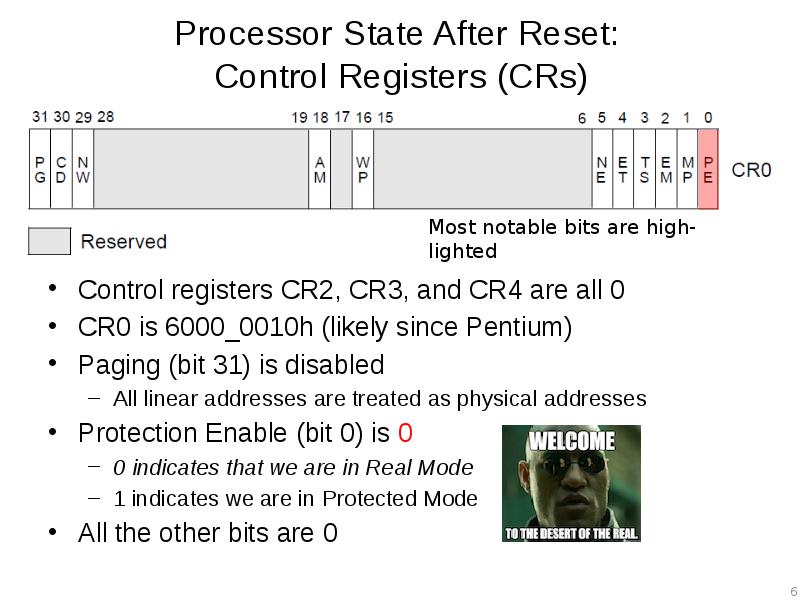
- 6. Processor State After Reset: Control Registers (CRs) Control registers CR2, CR3,
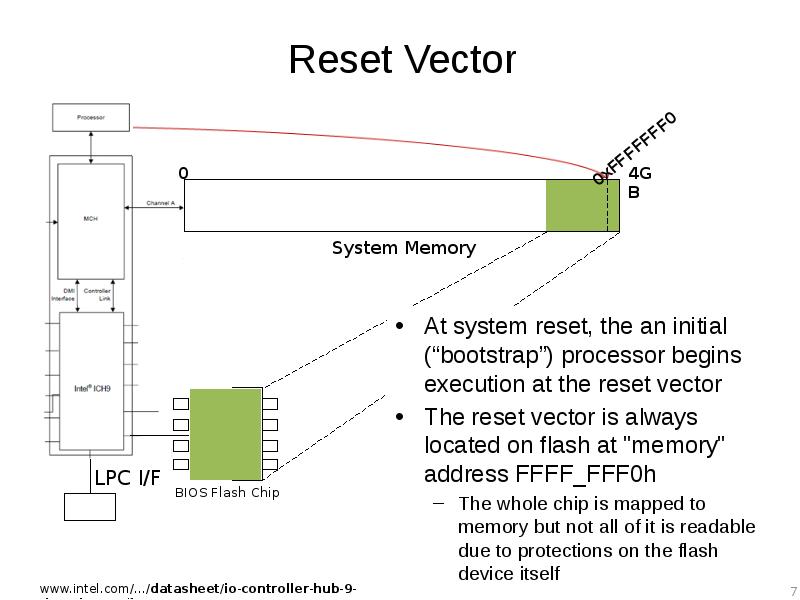
- 7. Reset Vector At system reset, the an initial (“bootstrap”) processor begins
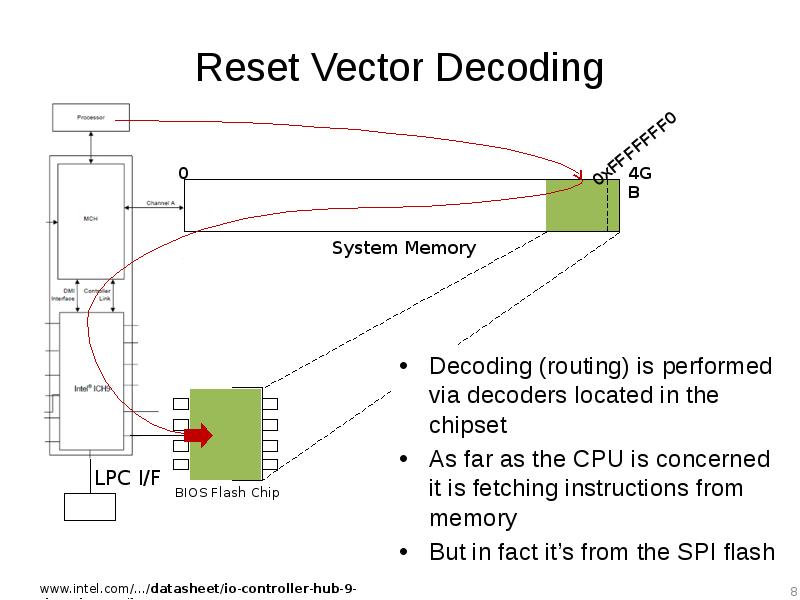
- 8. Reset Vector Decoding Decoding (routing) is performed via decoders located in
- 9. Aside: Forensics People If the top of memory always contains a
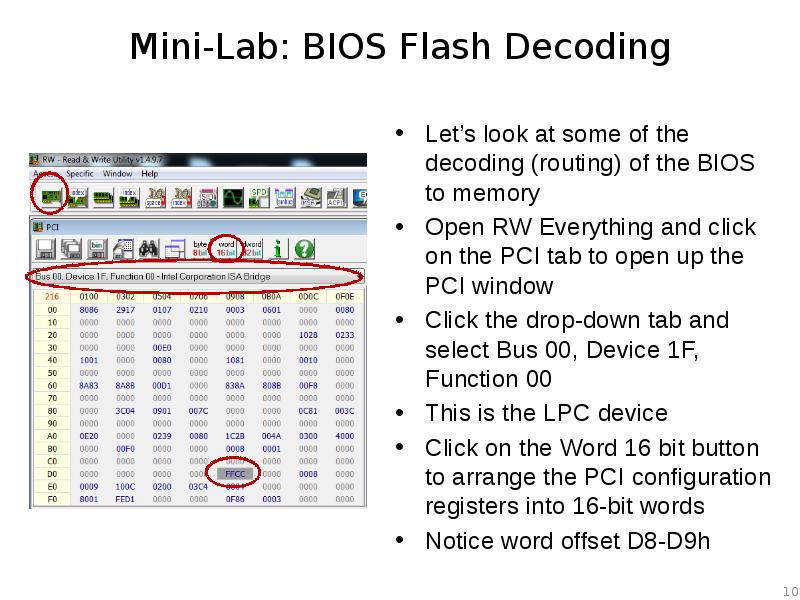
- 10. Mini-Lab: BIOS Flash Decoding Let’s look at some of the decoding
- 11. Mini-Lab: BIOS Flash Decoding Offset D8-D9h is FWH_DEC_EN1 As stated, this
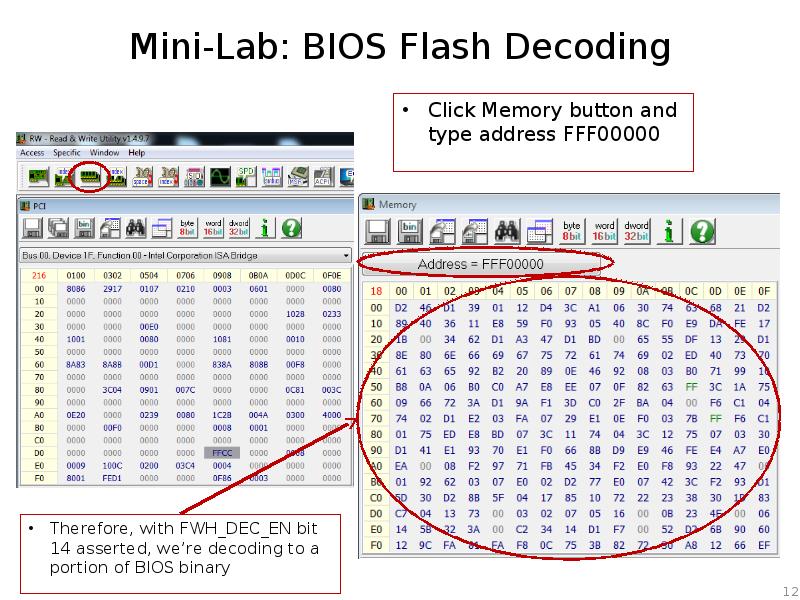
- 12. Mini-Lab: BIOS Flash Decoding Therefore, with FWH_DEC_EN bit 14 asserted, we’re
- 13. Mini-Lab: BIOS Flash Decoding
- 14. Mini-Lab: BIOS Flash Decoding Reset it back to 0xFFCC Couple of
- 15. Mini-data-collection Lab: Reset Vector in BIOS Binary If we dump the
- 16. Real Mode Memory 16-bit operating mode Segmented memory model When operating
- 17. Real Mode Addressing: Segment Registers CS, DS, SS, ES, FS, GS
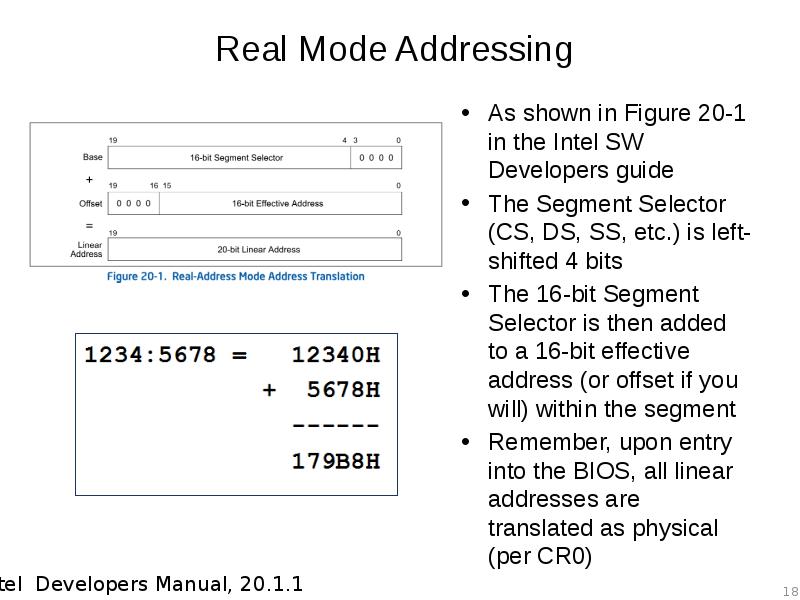
- 18. Real Mode Addressing As shown in Figure 20-1 in the Intel
- 19. Real Mode Addressing Problem: Overlap Addresses in different segments can overlap
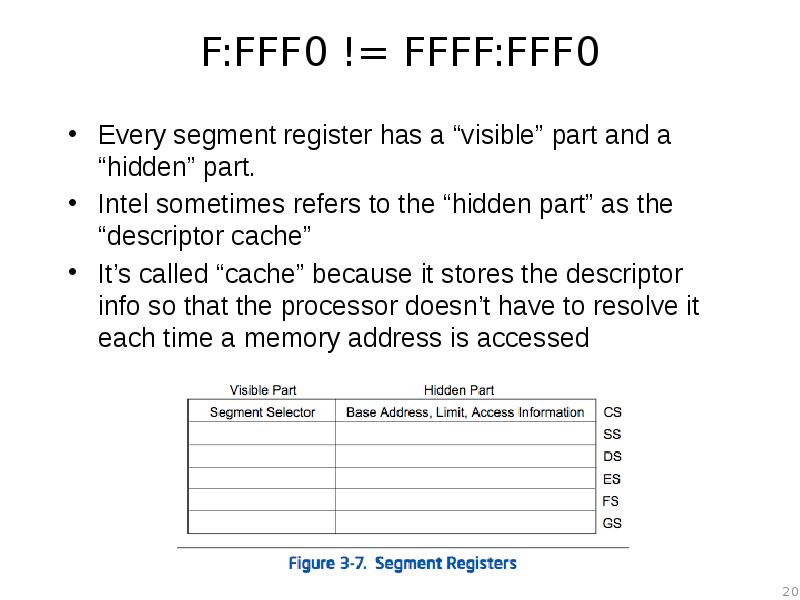
- 20. F:FFF0 != FFFF:FFF0 Every segment register has a “visible” part and
- 21. Descriptor Cache “When a segment selector is loaded into the visible
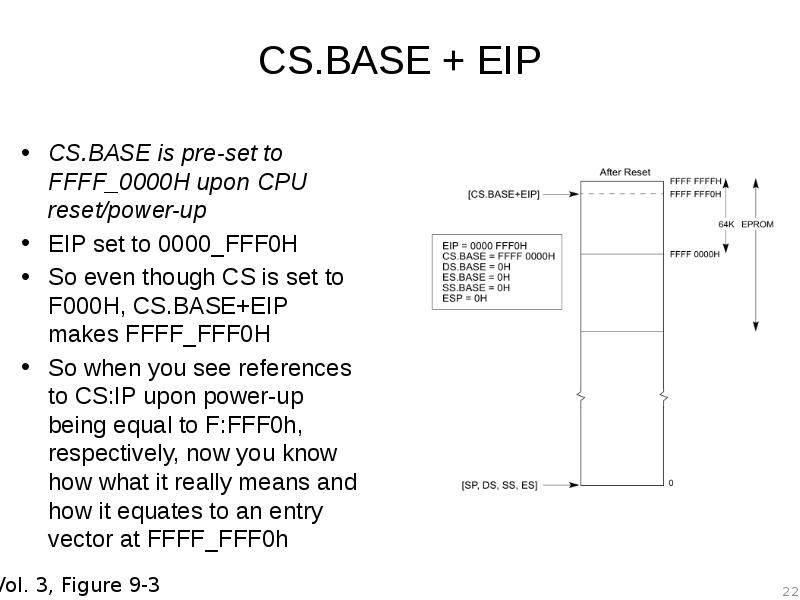
- 22. CS.BASE + EIP CS.BASE is pre-set to FFFF_0000H upon CPU reset/power-up
- 23. Reset Vector So upon startup, while the processor stays in Real
- 24. Analyzing any x86 BIOS Binary With UEFI we can usually skip
- 25. A dream deferred We’re going to hold off on the rest
- 26. 1: Disassemble the BIOS Binary Acquire a dump of the BIOS
- 27. FIXME Update procedure for new IDA demo 6.6
- 28. 2: Rebase the Program First thing we’re going to do is
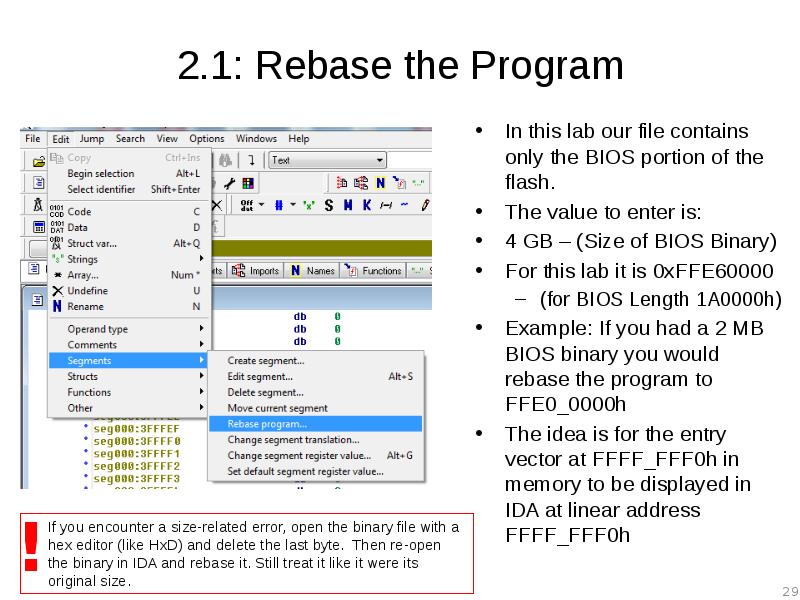
- 29. 2.1: Rebase the Program In this lab our file contains only
- 30. 2.2: Rebase the Program You know you have done it right
- 31. 3. Determine IDA Segments: Manually Analyze the Reset Vector JMP So
- 32. 3.1: JMP rel16 The address following our JMP instruction is FFFF_FFF3h
- 33. 3.2: Determine Segment Boundary So we know the destination of the
- 34. 4: Create Initial 16-bit Segment Edit –> Segments –> Create Segment
- 35. 5: Identify Memory Model Once this segment is created, IDA “automagically”
- 36. 5.1: LGDT Instruction LGDT loads the values in the source operand
- 37. 5.2: Import GDT/IDT Structures You can import these structures into IDA
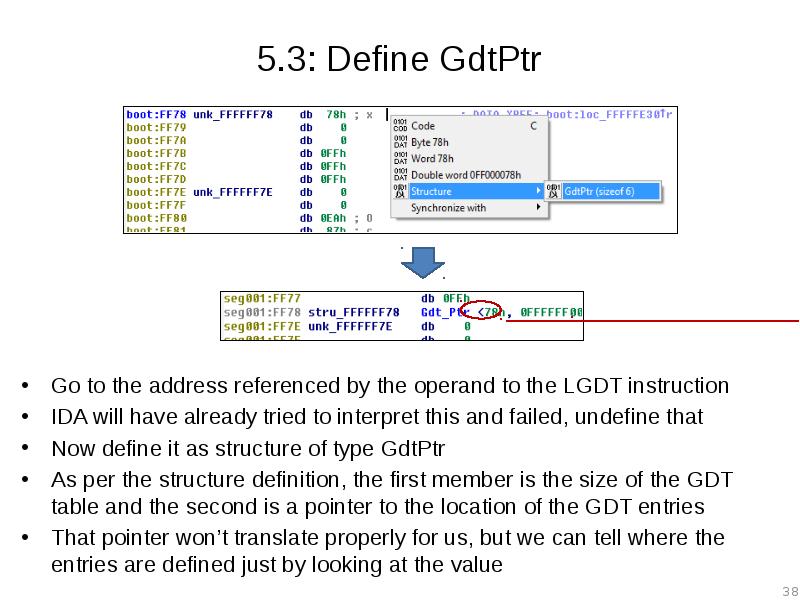
- 38. 5.3: Define GdtPtr Go to the address referenced by the operand
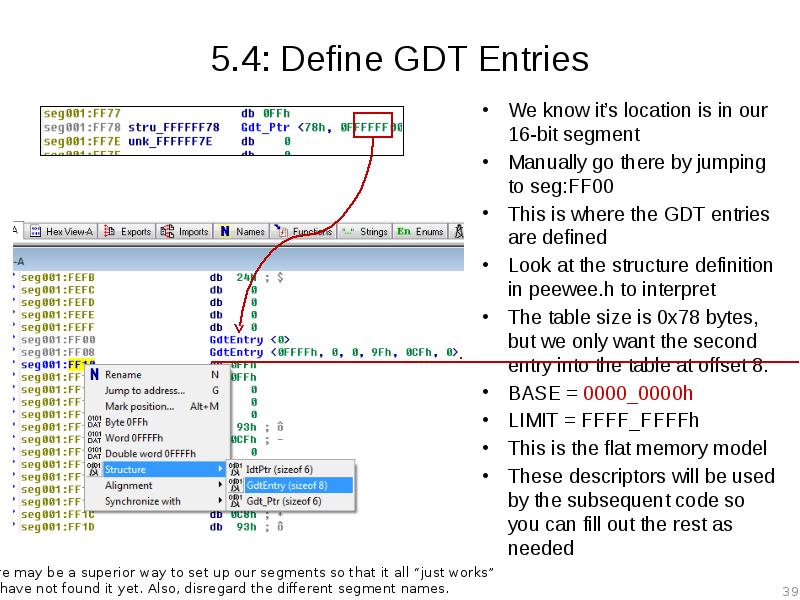
- 39. 5.4: Define GDT Entries We know it’s location is in our
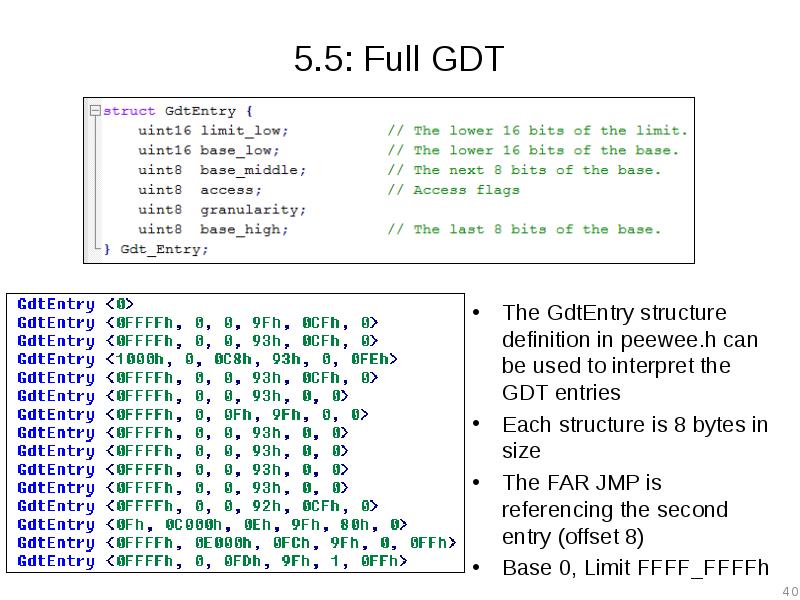
- 40. 5.5: Full GDT The GdtEntry structure definition in peewee.h can be
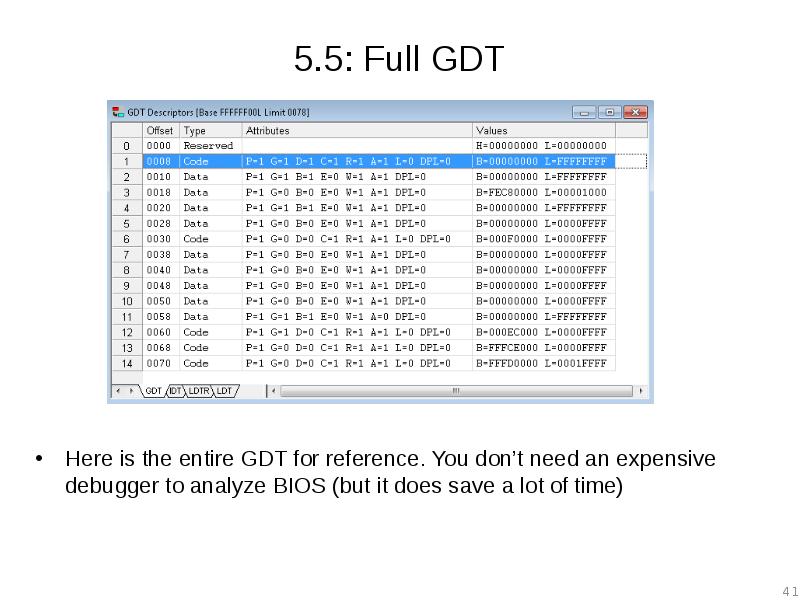
- 41. 5.5: Full GDT Here is the entire GDT for reference. You
- 42. 6: Create the 32-bit BIOS segment Now create the 32-bit segment
- 43. 7: Touch up the Far Jump So we know that this
- 44. Welcome to BIOS Analysis Converting the binary at FFFF_0100h to code
- 45. Why so Ugly? IDA Segments IDA can’t combine 16-bit and 32-bit
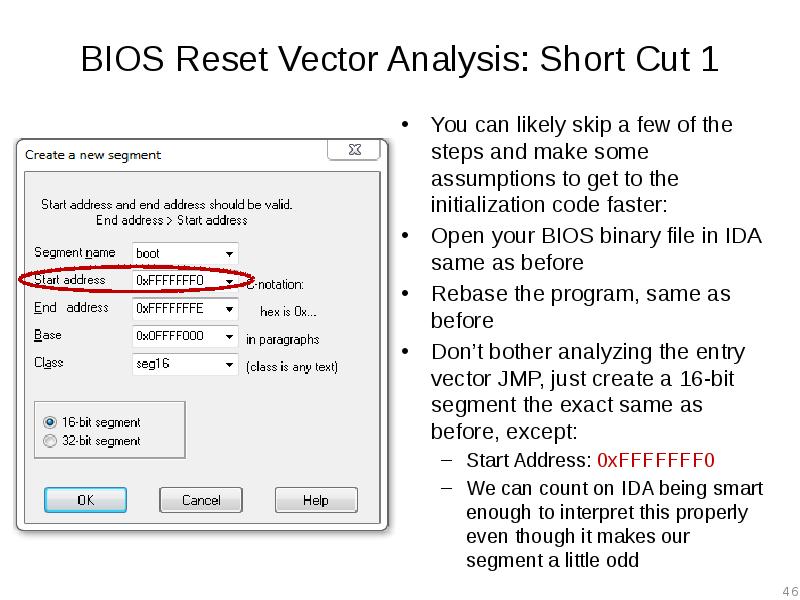
- 46. BIOS Reset Vector Analysis: Short Cut 1 You can likely skip
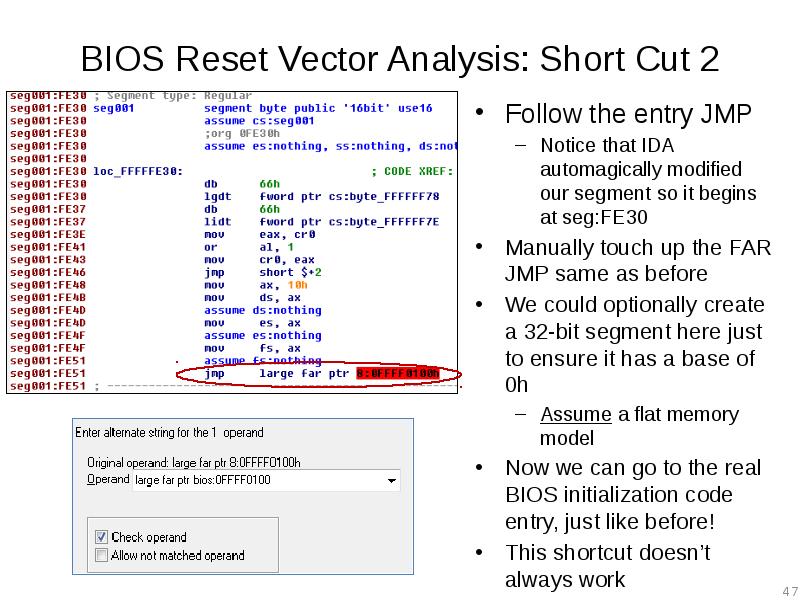
- 47. BIOS Reset Vector Analysis: Short Cut 2 Follow the entry JMP
- 48. Lab: Scratch the surface Repeat the process we just did for
- 49. Скачать презентацию










Слайды и текст этой презентации
Слайд 1
Описание слайда:
Advanced x86:
BIOS and System Management Mode Internals
Reset Vector
Слайд 2
Описание слайда:
All materials are licensed under a Creative Commons “Share Alike” license.
http://creativecommons.org/licenses/by-sa/3.0/
Слайд 3
Описание слайда:
Reset Vector
Execution Environment
Слайд 4
Описание слайда:
Real-Address Mode (Real Mode)
The original x86 operating mode
Referred to as “Real Mode” for short
Introduced way back in 8086/8088 processors
Was the only operating mode until Protected Mode (with its "virtual addresses") was introduced in the Intel 286
Exists today solely for compatibility so that code written for 8086 will still run on a modern processor
Someday processors will boot into protected mode instead
In the BIOS’ I have looked at, the general theme seems to be to get out of Real Mode as fast as possible
Therefore we won’t stay here long either
Слайд 5
Описание слайда:
Processor State After Reset
EAX, EBX, ECX, EBP, ESI, EDI, ESP are all reset to 0
EDX contains the CPU stepping identification information
Same info returned in EAX when CPUID is called with EAX initialized to ‘1’
*This will vary of course, the value in the table to the left corresponds to the Core2Duo inside the E6400
The base registers are 0 with the exception of CS which is initialized with F000
EIP (or IP since it’s 16-bit mode) is initialized with (0000)FFF0
CS:IP = F:FFF0h
EFLAGS is 00000002h
Only hard-coded bit 1 is asserted
If I were sitting at a breakpoint at the entry vector, then bit 16 (resume flag) would be asserted indicating that debug exceptions (#DB) are disabled.
Слайд 6
Описание слайда:
Processor State After Reset:
Control Registers (CRs)
Control registers CR2, CR3, and CR4 are all 0
CR0 is 6000_0010h (likely since Pentium)
Paging (bit 31) is disabled
All linear addresses are treated as physical addresses
Protection Enable (bit 0) is 0
0 indicates that we are in Real Mode
1 indicates we are in Protected Mode
All the other bits are 0
Слайд 7
Описание слайда:
Reset Vector
At system reset, the an initial (“bootstrap”) processor begins execution at the reset vector
The reset vector is always located on flash at "memory" address FFFF_FFF0h
The whole chip is mapped to memory but not all of it is readable due to protections on the flash device itself
Слайд 8
Описание слайда:
Reset Vector Decoding
Decoding (routing) is performed via decoders located in the chipset
As far as the CPU is concerned it is fetching instructions from memory
But in fact it’s from the SPI flash
Слайд 9
Описание слайда:
Aside: Forensics People
If the top of memory always contains a memory-mapped copy of part of the SPI flash chip, that means it should theoretically show up in memory forensic dumps (e.g. those given out by memory forensic challenges)
I’ve never had time to test this, but you should see if you can go grab some memory forensics dumps and determine whether there is a complete copy of the BIOS in the memory dump, or only a partial copy (and if partial, where it ends)
Probably should start by testing on a system you have known BIOS dump for
As I mentioned before, virtual machines have virtual BIOSes, so you could also determine if the dump was taken off a virtual machine by comparing against some virtual BIOSes
Let me know what you find! :)
A volatility plugin to carve BIOS out of memdumps would be cool
IIRC someone might have done this now, but I can’t find the link again…
Слайд 10
Описание слайда:
Mini-Lab: BIOS Flash Decoding
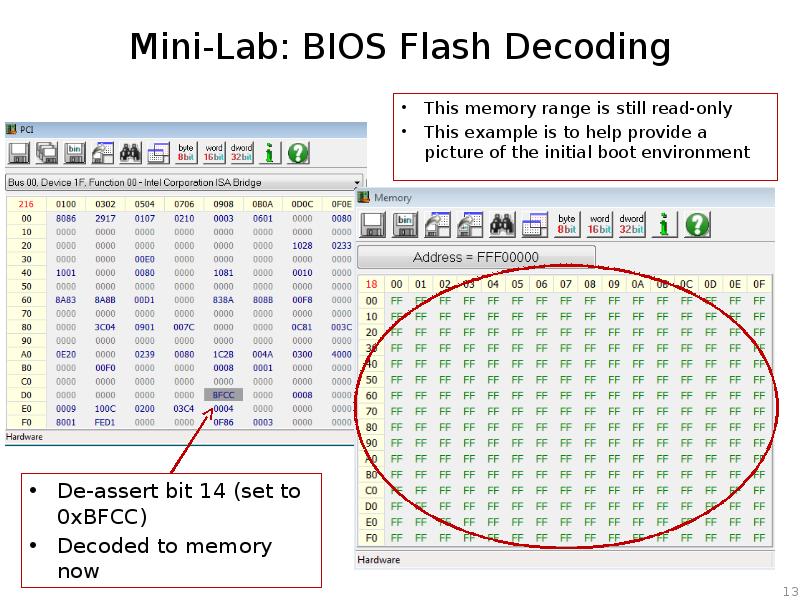
Let’s look at some of the decoding (routing) of the BIOS to memory
Open RW Everything and click on the PCI tab to open up the PCI window
Click the drop-down tab and select Bus 00, Device 1F, Function 00
This is the LPC device
Click on the Word 16 bit button to arrange the PCI configuration registers into 16-bit words
Notice word offset D8-D9h
Слайд 11
Описание слайда:
Mini-Lab: BIOS Flash Decoding
Offset D8-D9h is FWH_DEC_EN1
As stated, this controls the decoding of ranges to the FWH
If your system uses SPI and not a Firmware Hub (and it does since FWH is very rare), it still decodes to the SPI BIOS
We want bit 14 which decodes FFF0_0000h – FFF7_FFFFh
Слайд 12
Описание слайда:
Mini-Lab: BIOS Flash Decoding
Therefore, with FWH_DEC_EN bit 14 asserted, we’re decoding to a portion of BIOS binary
Слайд 13
Описание слайда:
Mini-Lab: BIOS Flash Decoding
Слайд 14
Описание слайда:
Mini-Lab: BIOS Flash Decoding
Reset it back to 0xFFCC
Couple of notes:
Your original values may differ since BIOS flips them on and off as the developers decided necessary
Bit 15 is Read Only and always asserted
Слайд 15
Описание слайда:
Mini-data-collection Lab:
Reset Vector in BIOS Binary
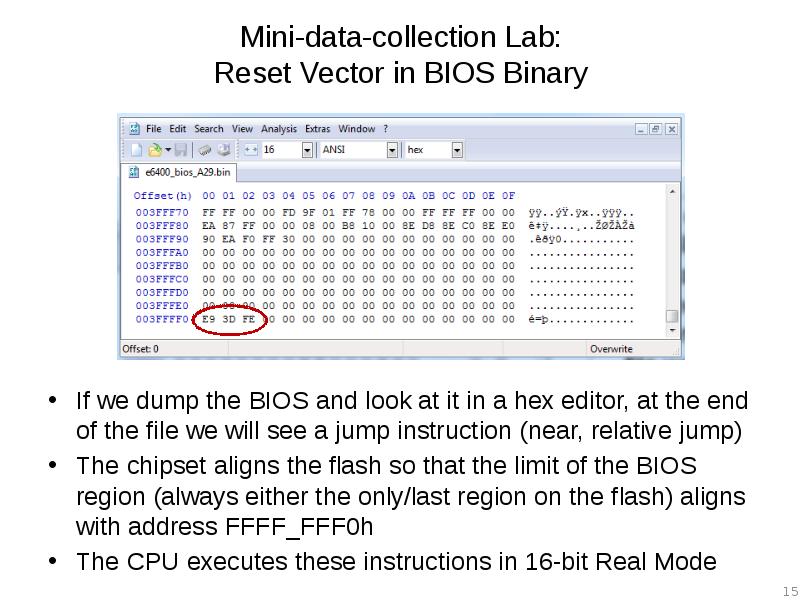
If we dump the BIOS and look at it in a hex editor, at the end of the file we will see a jump instruction (near, relative jump)
The chipset aligns the flash so that the limit of the BIOS region (always either the only/last region on the flash) aligns with address FFFF_FFF0h
The CPU executes these instructions in 16-bit Real Mode
Слайд 16
Описание слайда:
Real Mode Memory
16-bit operating mode
Segmented memory model
When operating in real-address mode, the default addressing and operand size is 16 bits
An address-size override can be used in real-address mode to enable access to 32-bit addressing (like the extended general-purpose registers EAX, EDX, etc.)
However, the maximum allowable 32-bit linear address is still 000F_FFFFH (220 -1)
So how can it address FFFF_FFF0h?
We’ll answer that in a bit
Слайд 17
Описание слайда:
Real Mode Addressing: Segment Registers
CS, DS, SS, ES, FS, GS
Only six segments can be active at any one time
16-bit segment selector contains a pointer to a memory segment of 64 Kbytes (max)
16-bit Effective address can access up to 64KB of memory address space
Segment Selector combines with effective address to provide a 20-bit linear address
So an application running in real mode can access an address space of up to 384 KB at a time (including stack segment) without switching segments
Слайд 18
Описание слайда:
Real Mode Addressing
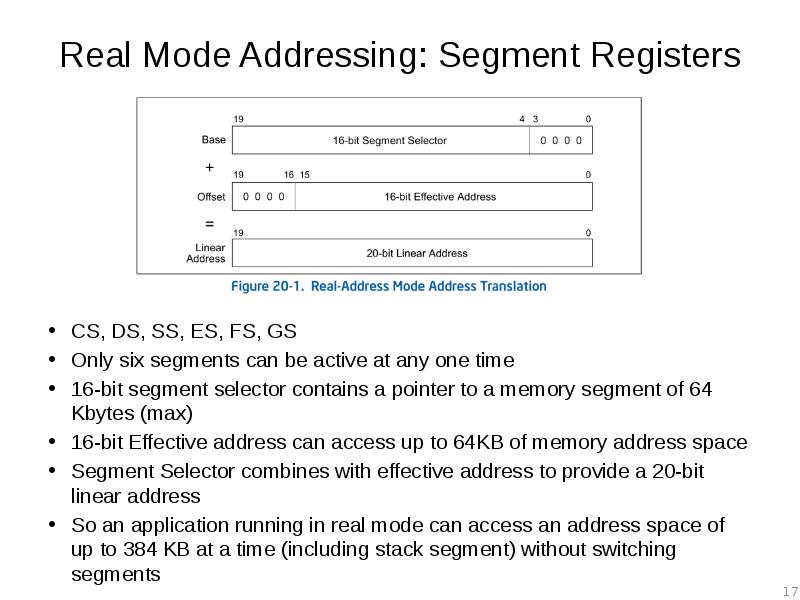
As shown in Figure 20-1 in the Intel SW Developers guide
The Segment Selector (CS, DS, SS, etc.) is left-shifted 4 bits
The 16-bit Segment Selector is then added to a 16-bit effective address (or offset if you will) within the segment
Remember, upon entry into the BIOS, all linear addresses are translated as physical (per CR0)
Слайд 19
Описание слайда:
Real Mode Addressing Problem: Overlap
Addresses in different segments can overlap
Given such a limited environment it’s no wonder we want to choose a different operating mode as soon as possible
Слайд 20
Описание слайда:
F:FFF0 != FFFF:FFF0
Every segment register has a “visible” part and a “hidden” part.
Intel sometimes refers to the “hidden part” as the “descriptor cache”
It’s called “cache” because it stores the descriptor info so that the processor doesn’t have to resolve it each time a memory address is accessed
Слайд 21
Описание слайда:
Descriptor Cache
“When a segment selector is loaded into the visible part of a segment register, the processor also loads the hidden part of the segment register with the base address, segment limit, and [access information] from the segment descriptor pointed to by the segment selector.”
Real Mode doesn’t have protected mode style access-control so the [access information] part is ignored
This means that the hidden part isn’t modified until after a value is loaded into the segment selector
So the moment CS is modified, the CS.BASE of FFFF_0000H is replaced with the new value of CS (left shifted 4 bits)
Слайд 22
Описание слайда:
CS.BASE + EIP
CS.BASE is pre-set to FFFF_0000H upon CPU reset/power-up
EIP set to 0000_FFF0H
So even though CS is set to F000H, CS.BASE+EIP makes FFFF_FFF0H
So when you see references to CS:IP upon power-up being equal to F:FFF0h, respectively, now you know how what it really means and how it equates to an entry vector at FFFF_FFF0h
Слайд 23
Описание слайда:
Reset Vector
So upon startup, while the processor stays in Real Mode, it can access only the memory range FFFF_0000h to FFFF_FFFFh.
If BIOS were to modify CS while still in Real Mode, the processor would only be able to address 0_0000h to F_FFFFh.
PAM0 helps out by mapping this range to high memory (another decoder)
So therefore if your BIOS is large enough that it is mapped below FFFF_0000H and you want to access that part of it, you best get yourself into Protected Mode ASAP.
And this is typically what they do
Слайд 24
Описание слайда:
Analyzing any x86 BIOS Binary
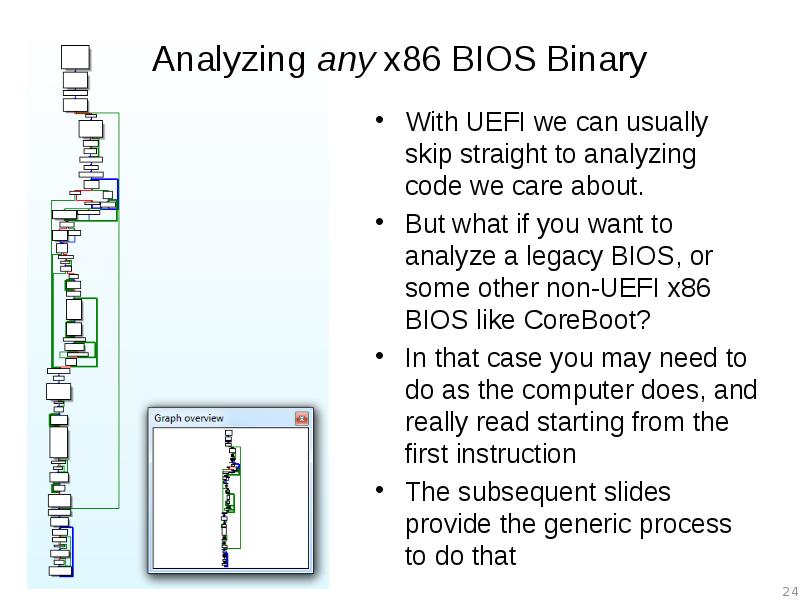
With UEFI we can usually skip straight to analyzing code we care about.
But what if you want to analyze a legacy BIOS, or some other non-UEFI x86 BIOS like CoreBoot?
In that case you may need to do as the computer does, and really read starting from the first instruction
The subsequent slides provide the generic process to do that
Слайд 25
Описание слайда:
A dream deferred
We’re going to hold off on the rest of the entry vector analysis for now, and go back to it later if we have time.
We never have time ;)
I left the slides in here for if you want to try to go through an equivalent process
Note: I know the slides are a little hard to follow and occasionally make jumps in intuition. I’ve been wanting to clean these up from John’s version, but haven’t had time
Слайд 26
Описание слайда:
1: Disassemble the BIOS Binary
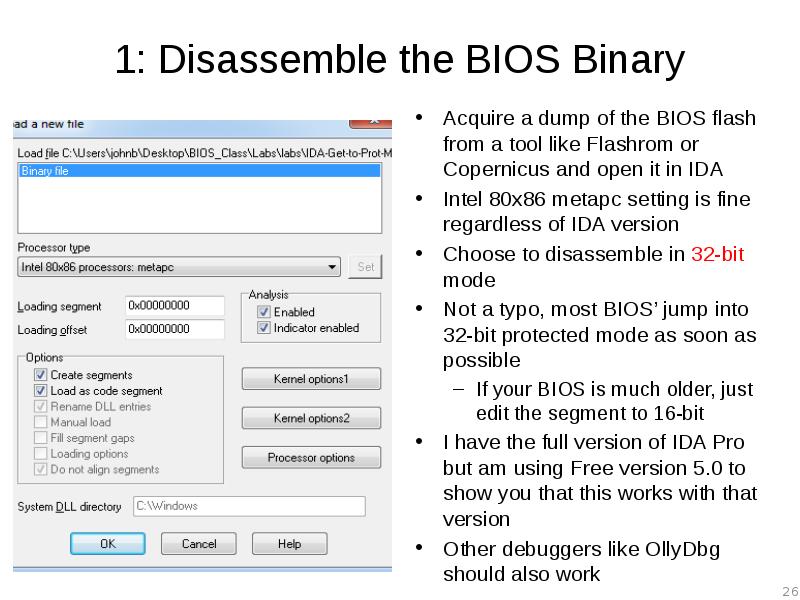
Acquire a dump of the BIOS flash from a tool like Flashrom or Copernicus and open it in IDA
Intel 80x86 metapc setting is fine regardless of IDA version
Choose to disassemble in 32-bit mode
Not a typo, most BIOS’ jump into 32-bit protected mode as soon as possible
If your BIOS is much older, just edit the segment to 16-bit
I have the full version of IDA Pro but am using Free version 5.0 to show you that this works with that version
Other debuggers like OllyDbg should also work
Слайд 27
Описание слайда:
FIXME
Update procedure for new IDA demo 6.6
Слайд 28
Описание слайда:
2: Rebase the Program
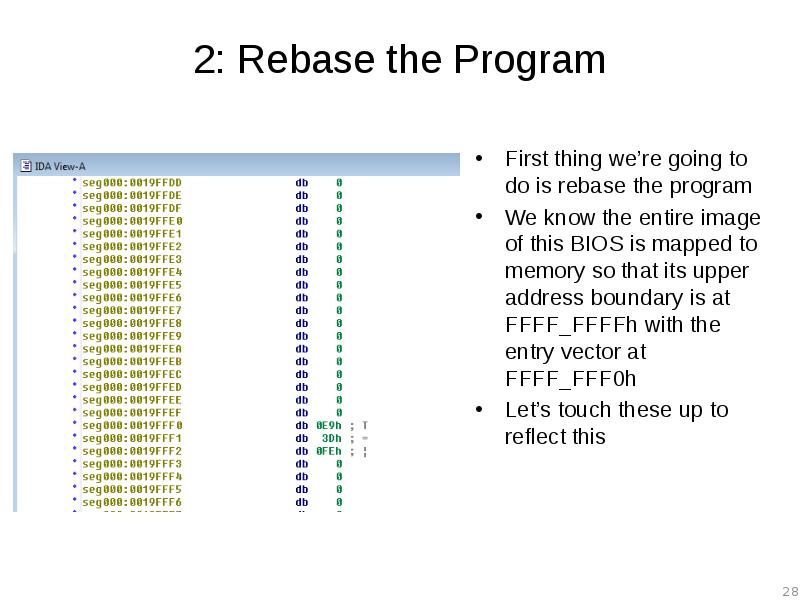
First thing we’re going to do is rebase the program
We know the entire image of this BIOS is mapped to memory so that its upper address boundary is at FFFF_FFFFh with the entry vector at FFFF_FFF0h
Let’s touch these up to reflect this
Слайд 29
Описание слайда:
2.1: Rebase the Program
In this lab our file contains only the BIOS portion of the flash.
The value to enter is:
4 GB – (Size of BIOS Binary)
For this lab it is 0xFFE60000
(for BIOS Length 1A0000h)
Example: If you had a 2 MB BIOS binary you would rebase the program to FFE0_0000h
The idea is for the entry vector at FFFF_FFF0h in memory to be displayed in IDA at linear address FFFF_FFF0h
Слайд 30
Описание слайда:
2.2: Rebase the Program
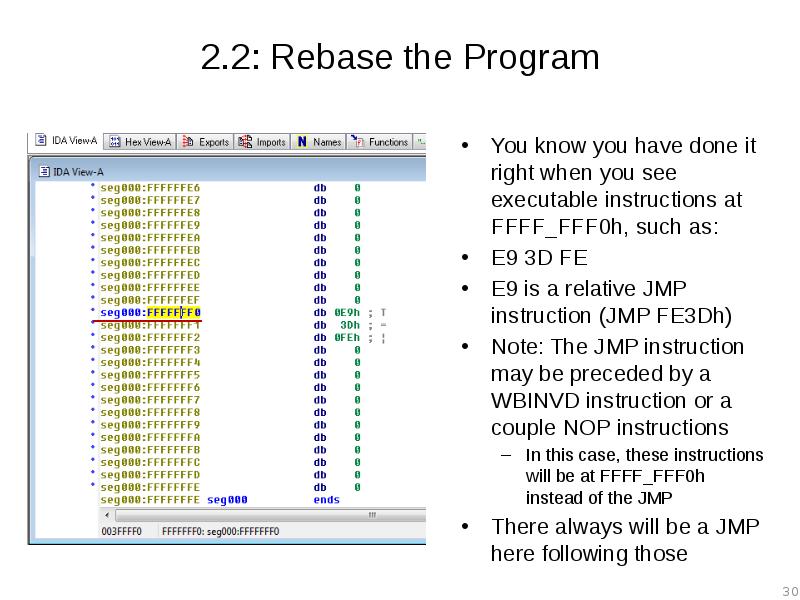
You know you have done it right when you see executable instructions at FFFF_FFF0h, such as:
E9 3D FE
E9 is a relative JMP instruction (JMP FE3Dh)
Note: The JMP instruction may be preceded by a WBINVD instruction or a couple NOP instructions
In this case, these instructions will be at FFFF_FFF0h instead of the JMP
There always will be a JMP here following those
Слайд 31
Описание слайда:
3. Determine IDA Segments:
Manually Analyze the Reset Vector JMP
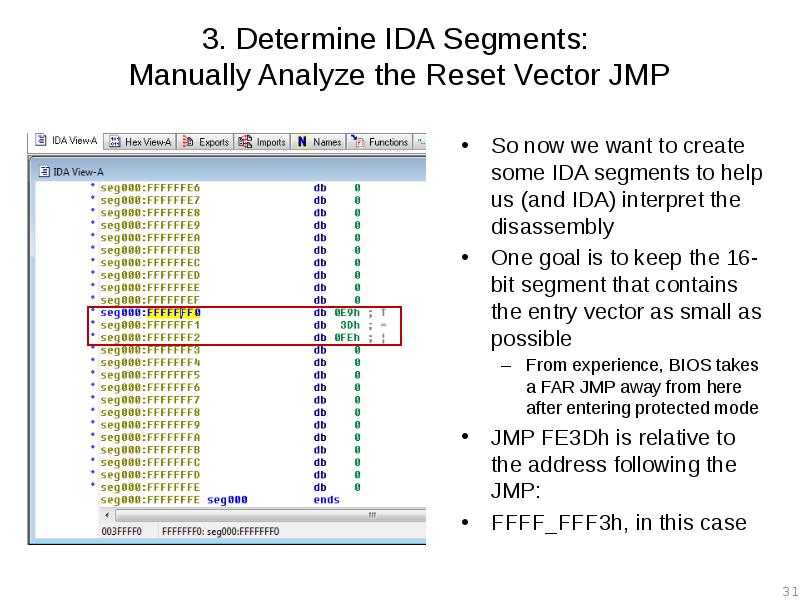
So now we want to create some IDA segments to help us (and IDA) interpret the disassembly
One goal is to keep the 16-bit segment that contains the entry vector as small as possible
From experience, BIOS takes a FAR JMP away from here after entering protected mode
JMP FE3Dh is relative to the address following the JMP:
FFFF_FFF3h, in this case
Слайд 32
Описание слайда:
3.1: JMP rel16
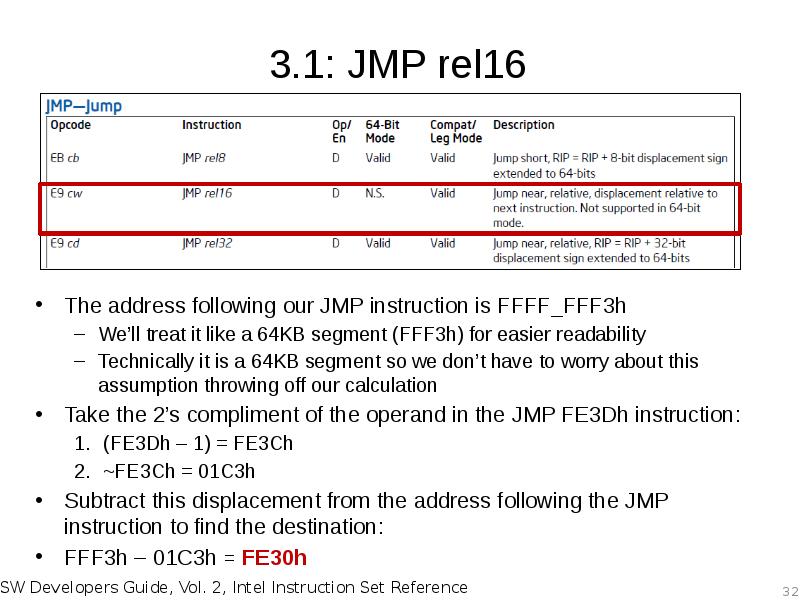
The address following our JMP instruction is FFFF_FFF3h
We’ll treat it like a 64KB segment (FFF3h) for easier readability
Technically it is a 64KB segment so we don’t have to worry about this assumption throwing off our calculation
Take the 2’s compliment of the operand in the JMP FE3Dh instruction:
(FE3Dh – 1) = FE3Ch
~FE3Ch = 01C3h
Subtract this displacement from the address following the JMP instruction to find the destination:
FFF3h – 01C3h = FE30h
Слайд 33
Описание слайда:
3.2: Determine Segment Boundary
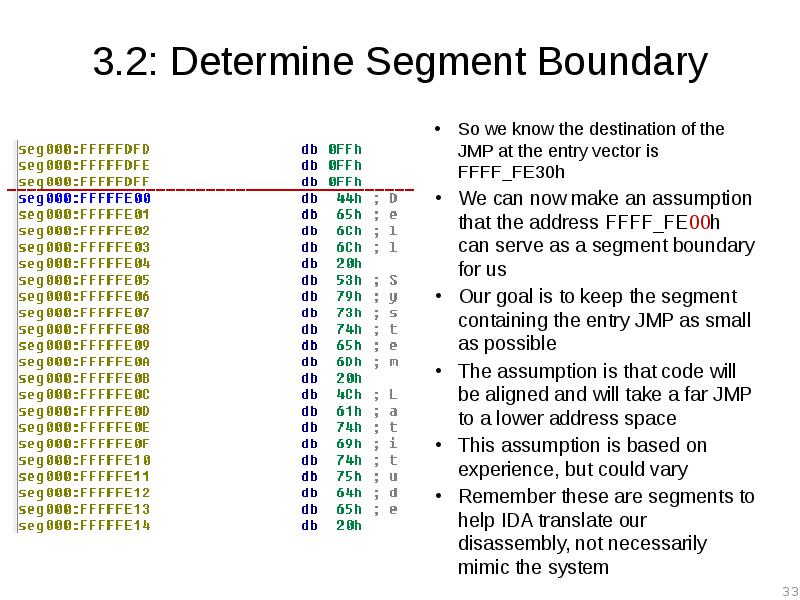
So we know the destination of the JMP at the entry vector is FFFF_FE30h
We can now make an assumption that the address FFFF_FE00h can serve as a segment boundary for us
Our goal is to keep the segment containing the entry JMP as small as possible
The assumption is that code will be aligned and will take a far JMP to a lower address space
This assumption is based on experience, but could vary
Remember these are segments to help IDA translate our disassembly, not necessarily mimic the system
Слайд 34
Описание слайда:
4: Create Initial 16-bit Segment
Edit –> Segments –> Create Segment
Pick any segment name you want
Class can be any text name
16-bit segment
Start Address = 0xFFFFFE00
End Address = 0xFFFFFFFE
Remember: IDA Does not like the address FFFFFFFF (-1) !!
Actually, according to IDA documentation, the 32-bit version of IDA doesn’t “like” any address at or above FF00_0000h
Base = 0x0FFFF000
CS.BASE = FFFF_0000h on boot
Слайд 35
Описание слайда:
5: Identify Memory Model
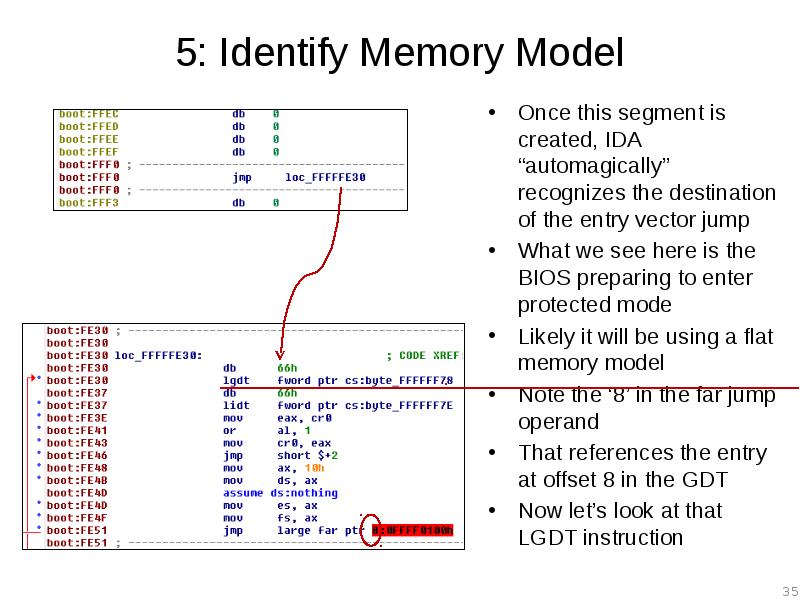
Once this segment is created, IDA “automagically” recognizes the destination of the entry vector jump
What we see here is the BIOS preparing to enter protected mode
Likely it will be using a flat memory model
Note the ‘8’ in the far jump operand
That references the entry at offset 8 in the GDT
Now let’s look at that LGDT instruction
Слайд 36
Описание слайда:
5.1: LGDT Instruction
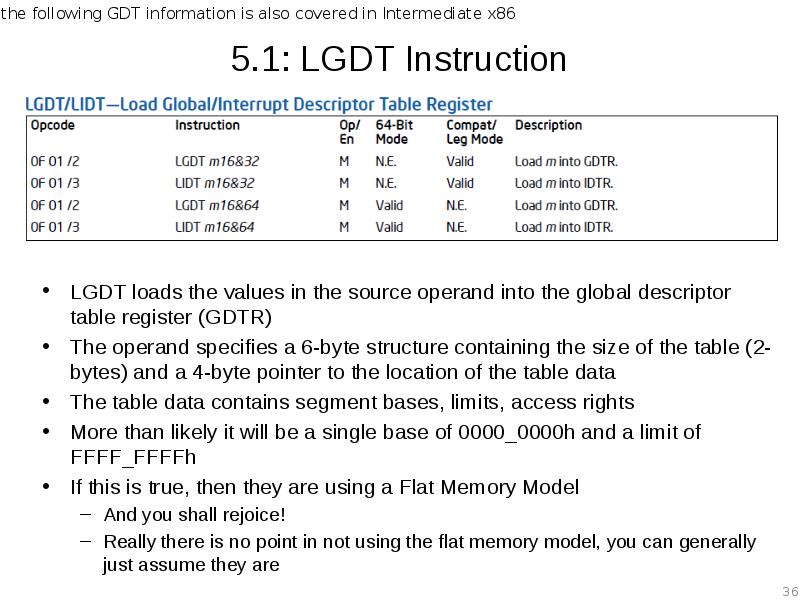
LGDT loads the values in the source operand into the global descriptor table register (GDTR)
The operand specifies a 6-byte structure containing the size of the table (2-bytes) and a 4-byte pointer to the location of the table data
The table data contains segment bases, limits, access rights
More than likely it will be a single base of 0000_0000h and a limit of FFFF_FFFFh
If this is true, then they are using a Flat Memory Model
And you shall rejoice!
Really there is no point in not using the flat memory model, you can generally just assume they are
Слайд 37
Описание слайда:
5.2: Import GDT/IDT Structures
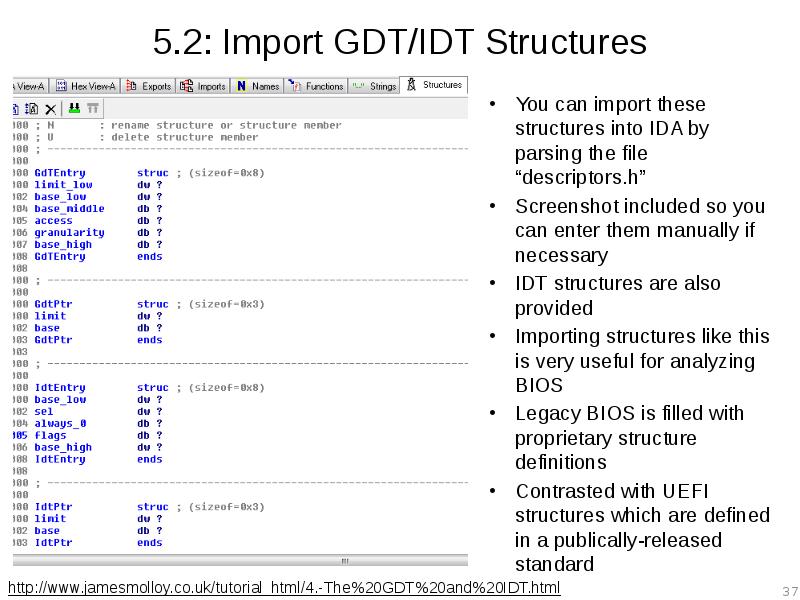
You can import these structures into IDA by parsing the file “descriptors.h”
Screenshot included so you can enter them manually if necessary
IDT structures are also provided
Importing structures like this is very useful for analyzing BIOS
Legacy BIOS is filled with proprietary structure definitions
Contrasted with UEFI structures which are defined in a publically-released standard
Слайд 38
Описание слайда:
5.3: Define GdtPtr
Go to the address referenced by the operand to the LGDT instruction
IDA will have already tried to interpret this and failed, undefine that
Now define it as structure of type GdtPtr
As per the structure definition, the first member is the size of the GDT table and the second is a pointer to the location of the GDT entries
That pointer won’t translate properly for us, but we can tell where the entries are defined just by looking at the value
Слайд 39
Описание слайда:
5.4: Define GDT Entries
We know it’s location is in our 16-bit segment
Manually go there by jumping to seg:FF00
This is where the GDT entries are defined
Look at the structure definition in peewee.h to interpret
The table size is 0x78 bytes, but we only want the second entry into the table at offset 8:
BASE = 0000_0000h
LIMIT = FFFF_FFFFh
This is the flat memory model
These descriptors will be used by the subsequent code so you can fill out the rest as needed
Слайд 40
Описание слайда:
5.5: Full GDT
The GdtEntry structure definition in peewee.h can be used to interpret the GDT entries
Each structure is 8 bytes in size
The FAR JMP is referencing the second entry (offset 8)
Base 0, Limit FFFF_FFFFh
Слайд 41
Описание слайда:
5.5: Full GDT
Here is the entire GDT for reference. You don’t need an expensive debugger to analyze BIOS (but it does save a lot of time)
Слайд 42
Описание слайда:
6: Create the 32-bit BIOS segment
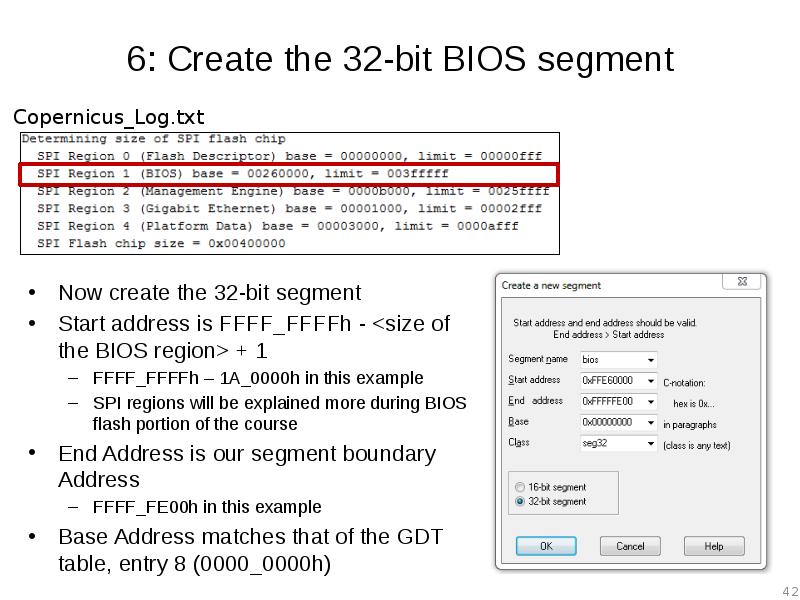
Now create the 32-bit segment
Start address is FFFF_FFFFh - <size of the BIOS region> + 1
FFFF_FFFFh – 1A_0000h in this example
SPI regions will be explained more during BIOS flash portion of the course
End Address is our segment boundary Address
FFFF_FE00h in this example
Base Address matches that of the GDT table, entry 8 (0000_0000h)
Слайд 43
Описание слайда:
7: Touch up the Far Jump
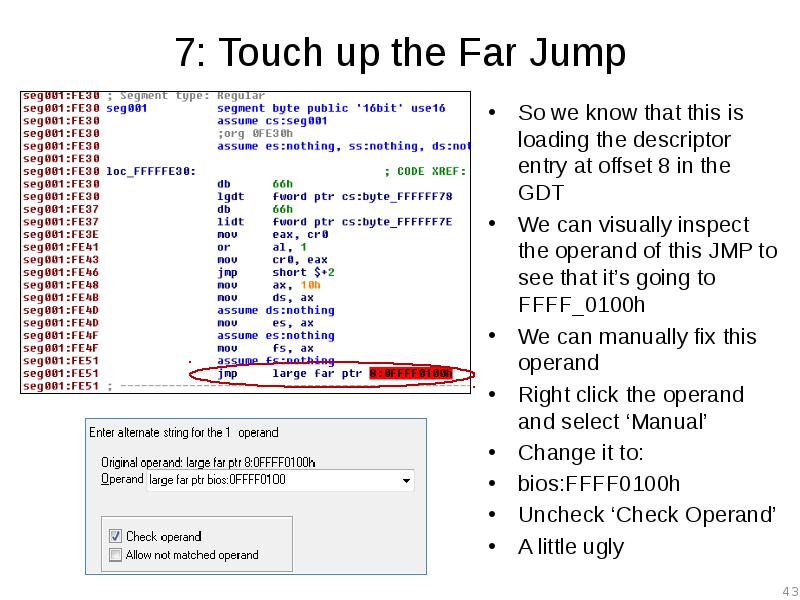
So we know that this is loading the descriptor entry at offset 8 in the GDT
We can visually inspect the operand of this JMP to see that it’s going to FFFF_0100h
We can manually fix this operand
Right click the operand and select ‘Manual’
Change it to:
bios:FFFF0100h
Uncheck ‘Check Operand’
A little ugly
Слайд 44
Описание слайда:
Welcome to BIOS Analysis
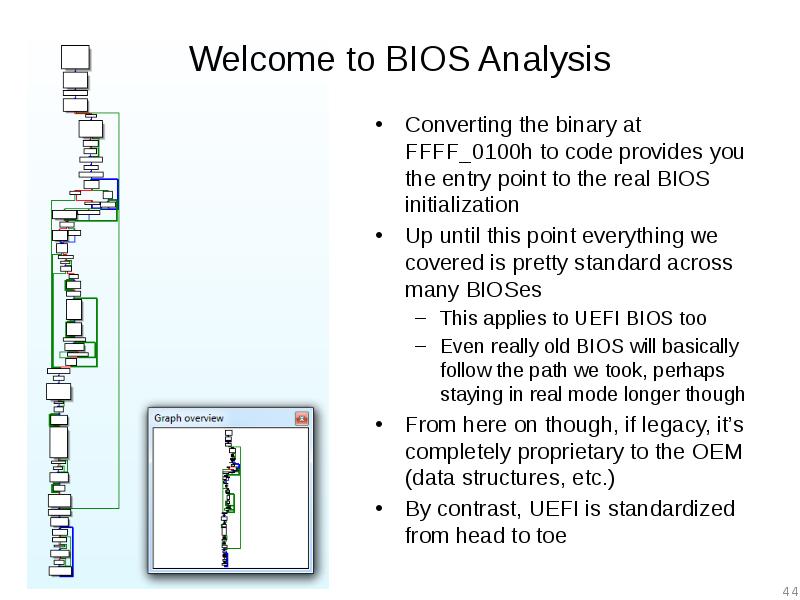
Converting the binary at FFFF_0100h to code provides you the entry point to the real BIOS initialization
Up until this point everything we covered is pretty standard across many BIOSes
This applies to UEFI BIOS too
Even really old BIOS will basically follow the path we took, perhaps staying in real mode longer though
From here on though, if legacy, it’s completely proprietary to the OEM (data structures, etc.)
By contrast, UEFI is standardized from head to toe
Слайд 45
Описание слайда:
Why so Ugly? IDA Segments
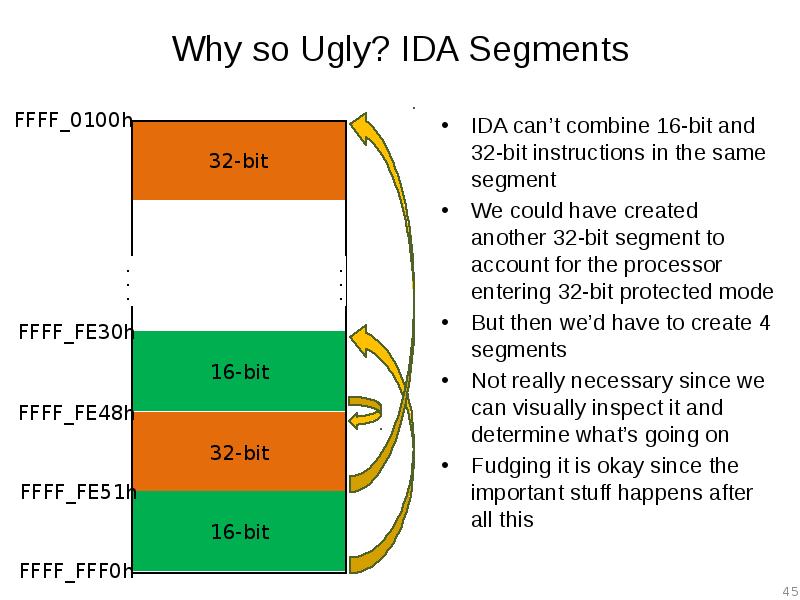
IDA can’t combine 16-bit and 32-bit instructions in the same segment
We could have created another 32-bit segment to account for the processor entering 32-bit protected mode
But then we’d have to create 4 segments
Not really necessary since we can visually inspect it and determine what’s going on
Fudging it is okay since the important stuff happens after all this
Слайд 46
Описание слайда:
BIOS Reset Vector Analysis: Short Cut 1
You can likely skip a few of the steps and make some assumptions to get to the initialization code faster:
Open your BIOS binary file in IDA same as before
Rebase the program, same as before
Don’t bother analyzing the entry vector JMP, just create a 16-bit segment the exact same as before, except:
Start Address: 0xFFFFFFF0
We can count on IDA being smart enough to interpret this properly even though it makes our segment a little odd
Слайд 47
Описание слайда:
BIOS Reset Vector Analysis: Short Cut 2
Follow the entry JMP
Notice that IDA automagically modified our segment so it begins at seg:FE30
Manually touch up the FAR JMP same as before
We could optionally create a 32-bit segment here just to ensure it has a base of 0h
Assume a flat memory model
Now we can go to the real BIOS initialization code entry, just like before!
This shortcut doesn’t always work
Слайд 48
Описание слайда:
Lab: Scratch the surface
Repeat the process we just did for the E6400 BIOS on each of your BIOS dumps
We'll see if there are any where it leads to early confusion
Скачать презентацию на тему Advanced x86. BIOS and System Management Mode Internals Reset Vector можно ниже: